
This guide checks ten reasons a website can be missing from Google: it is new, closed to visitors, told to stay out, blocked, found but not indexed, moved badly, penalised, hacked, removed on request, or already in Google and just not where you look. This guide works through them in a fixed order with free tools. Every quotation from Google below comes from a Google page I read on 24 November 2026, and the page is linked beside it. Quotations about WordPress, Wix, Squarespace and Shopify come from those platforms' help pages. Plain-English explanations, tool notes and the order of the checks are my own.
Two terms first. Indexed means Google has added your page to its index, the store it draws results from. It does not guarantee the page will show. Search Console is Google's free tool that shows what Google knows about your site.
At a glance
- Search
site:plus the exact address of the page you care about. For examplesite:yourdomain.co.uk/services/. Google says that if you see results, the page is in the index. Nothing in the list means keep going. - Stop at the first check that fails. The order is: new or not, the page's own search, open to visitors, not told to stay out, Search Console status, penalty and hacking reports, then removals.
- Several fixes are one setting. WordPress, Wix, Squarespace and Shopify each have a visibility switch. A forgotten switch is worth checking before anything technical.
- No one can promise a date. Google says indexing "isn't guaranteed". For a new page it gives a range of "a day or two to a few weeks, typically".
- Get help when the report names a penalty, a hack or a botched move. Those need a person. So does an older site where every check is clear.
The decision tree
Follow the steps from top to bottom. Each box tells you which cause to read next. The labels in quotation marks are the status names as written in Google's help. I have not seen your live screen, so the wording there may differ slightly.
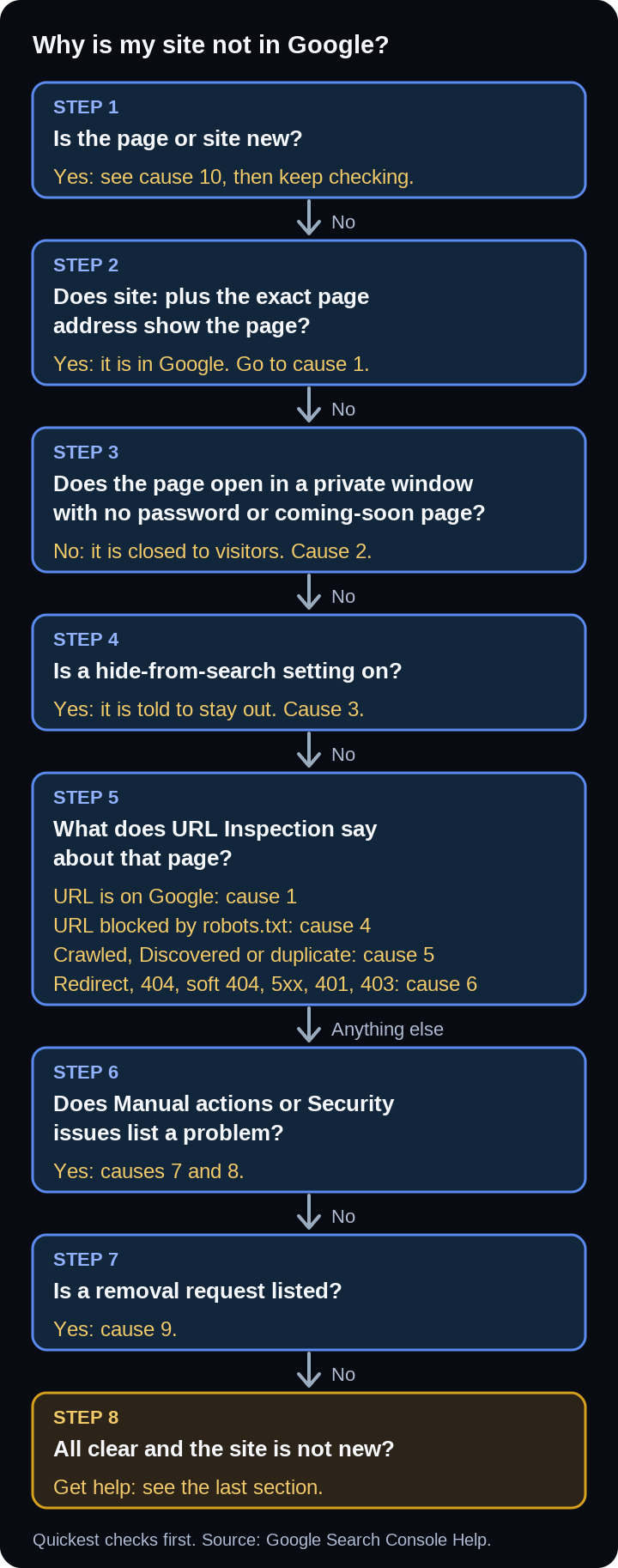
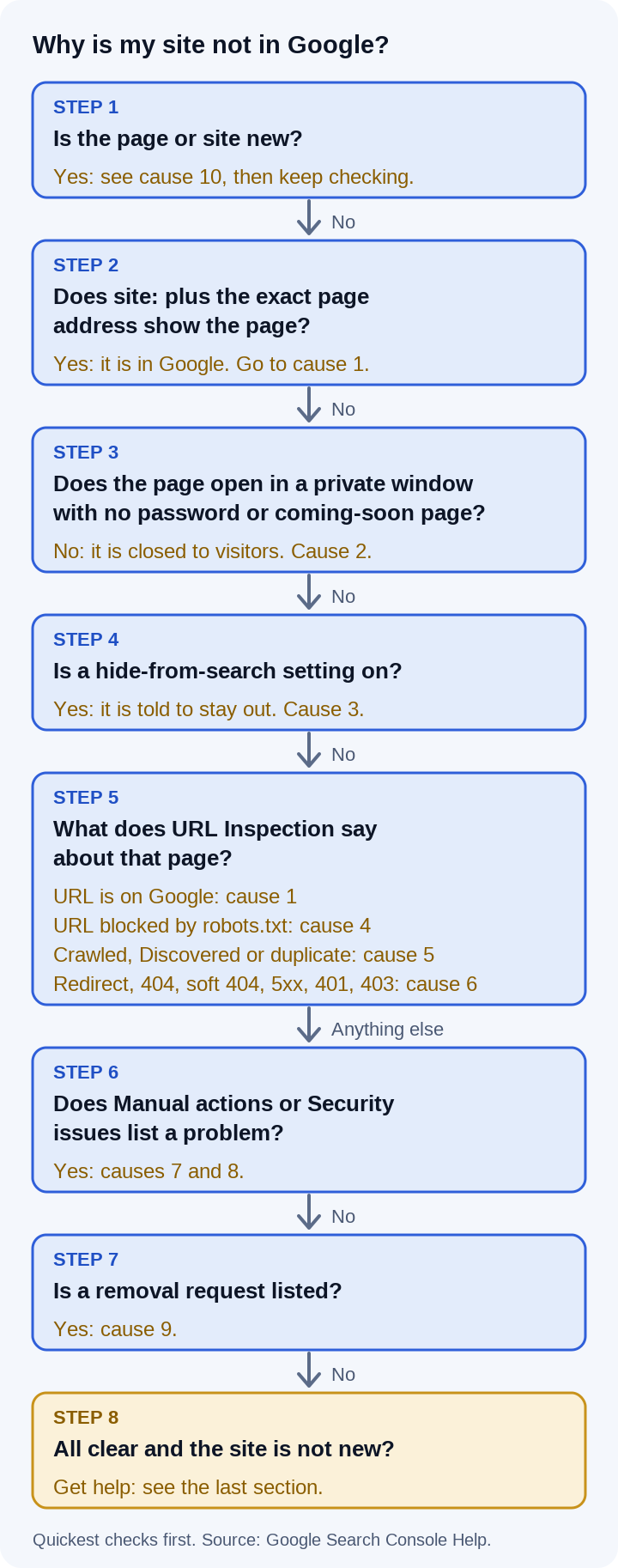
The same steps as text:
- Is the page or site new? New means created, rebuilt or submitted in the last few weeks. Yes: read cause 10 for what to expect, then carry on with step 2, because a new site can have other causes too. No: step 2.
- Search
site:followed by the exact address of the page you want found. For examplesite:yourdomain.co.uk/services/. It shows: cause 1. It does not show: step 3. - Open the page in a private browser window. A password, a "coming soon" page or a "private" notice means cause 2. It opens normally: step 4.
- Check your platform's hide-from-search setting. It is switched on: cause 3. It is off: step 5.
- Inspect that page in Search Console and read the status. "URL is on Google": cause 1. "URL blocked by robots.txt": cause 4. "Crawled - currently not indexed", "Discovered - currently not indexed" or a duplicate status: cause 5. "Page with redirect", "Not found (404)", "Soft 404", "Server error (5xx)" or a 401 or 403 block: cause 6. Anything else: step 6.
- Open the Manual actions and Security issues reports. A problem is listed: cause 7 or cause 8. Both are clear: step 7.
- Check the Removals tool. A request is listed: cause 9. None: step 8.
- Everything is clear and the site is not new? Go to When should I get help?.
Before you start: add your site to Search Console
Steps 5 to 7 need a free Search Console account. Google says you "must first prove that you own the site". Your web developer or host can often do this for you.
- Go to Search Console and open the property selector.
- Select + Add property. Google's add a property help lists the choices.
- Choose a verification method. Google says "You will be asked to choose a verification method".
- Wait. Google says "Data should begin to appear in your property in a few days". The Search Console steps may have to wait until then.
Get your website on Google (last updated 10 December 2025) says Search Console can show "an error that might prevent Google from understanding your site".
Cause 1: Is my site in Google but not where I look?
How to tell. Step 2 listed the page, or URL Inspection says "URL is on Google". Or your business name finds you and your service does not. Google's URL Inspection help says "URL is on Google means that the URL is eligible to appear in Search results, but is not guaranteed to be there".
What Google says. Google's help page on missing pages says "Many people assume that they are not on Google, when in fact their page simply appears low in Search results". Results also differ by person. Google's How Search works page (last updated 18 December 2025) says relevance can include "the user's location, language, and device (desktop or phone)". Two people can see two lists for one search.
What to do.
- Turn off SafeSearch. Google lists "Turn off safe search" as the first check.
- Search
site:followed by the exact address of the page. Google's example issite:example.com/petstore/hamsters(missing pages help). To confirm a page is on Google, Google's URL Inspection help also says "search for the page URL on Google". - If the page appears, it is indexed. The job is now ranking, and that is slower work. My guide on how long SEO takes sets out what to expect.
Get your website on Google warns that the site: operator "doesn't necessarily return all the URLs that are indexed". Treat an empty list as a reason to check further, not as proof.
Cause 2: Is my site closed to visitors?
How to tell. Open your address in a private window. You see a password box, a "coming soon" page or a "private" notice.
What Google says. The same help page lists password protection among the reasons a page is blocked: "You are blocking the page with a robots.txt file, a noindex directive, or some other mechanism, such as password protection".
What to do. Each platform has a switch.
- Squarespace. Squarespace's help says "All sites are set to private by default". Make sure the site is on a paid subscription, open the Site Availability panel, select Public and click Save. After publishing, Squarespace says "search engines can find and index your site". Page: Publish or hide your site, last updated 10 September 2026.
- Shopify. Shopify says "In private mode, all of your online store's pages are hidden from visitors and search engines". The steps are: from your Shopify admin, go to Online Store, click Private, select Public and click Update. Page: Restrict access to your online store.
- Wix. Wix says "Password protected pages and private member pages don't show in search results, as they are not crawled and indexed". If a page you want found is password protected, remove the password. This step is my advice. Wix's page only says these pages are not crawled. Page: Preventing Search Engines from Indexing Your Page.
Cause 3: Did something tell Google to stay out?
How to tell. The site opens for visitors. The Page indexing report help lists a status "URL marked 'noindex'". That is the label as written in Google's help. Or a platform setting asks search engines to stay away.
What Google says. Google says noindex can be set with a meta tag or an HTTP response header (Block indexing, last updated 10 December 2025). A meta tag is a line of hidden code in the page. The Page indexing report help describes the status: "When Google tried to index the page it encountered a 'noindex' directive and therefore did not index it".
What to do. Check the setting for your platform. Menu names change, so each row links to the platform's own page.
Scroll horizontally if columns extend beyond the screen.
| Platform | The setting to look for | Where to find it |
|---|---|---|
| WordPress | The box "Discourage search engines from indexing this site" | Settings, then Reading. Page: Settings Reading screen, last updated 8 June 2024 |
| Wix | The toggle "Let search engines index your site" | SEO in the site dashboard, then "Go to SEO Settings" under Tools and settings. Page: Unpublishing your site |
| Squarespace | The box "Block Search engine crawlers" | Settings panel, then Crawlers. Page: Hiding your site from search results, last updated 22 May 2026 |
| Shopify | Private or Public access | Online Store in your Shopify admin (see cause 2) |
WordPress says to "Check the Discourage search engines from indexing this site box to ask search engines not to index this site". So leave it unticked. Wix says "Disable the Let search engines index your site toggle to prevent search engines from indexing your site". So leave it on. Squarespace's steps to hide a site are to open the Settings panel, click Crawlers and check the box next to the block option. So leave it unticked.
Paste your homepage into my free website grader. It reads the page's meta robots tag and flags noindex. It does not read the HTTP header version, so a clean result does not rule out noindex.
Cause 4: Is my site blocked by robots.txt?
How to tell. Google's Page indexing report help lists the status as "URL blocked by robots.txt". In URL Inspection, the Crawl allowed? line says whether a robots.txt rule blocked the page. The wording on your screen may differ slightly.
What Google says. robots.txt is a file on your site that tells crawlers which URLs they can access. Google says "This page was blocked by your site's robots.txt file". It also says robots.txt "is not a mechanism for keeping a web page out of Google". To keep a page out, "block indexing with noindex or password-protect the page" (Introduction to robots.txt, last updated 10 December 2025).
What to do.
- Type the full address of your page into the inspection search bar at the top of any Search Console screen. Google says the URL "must be in the currently opened property".
- Read the page status. Google says "URL is not on Google means that the URL can't appear in Search results".
- If the reason is robots.txt, ask your developer to remove the rule that blocks your pages. My robots.txt generator has a "Standard (allow all)" preset that gives them a clean file to compare.
Cause 5: Did Google find my page and choose not to index it?
How to tell. URL Inspection or the Page indexing report shows one of these statuses.
Scroll horizontally if columns extend beyond the screen.
| Status in Search Console | What Google says it means | What to do |
|---|---|---|
| Crawled - currently not indexed | "The page was crawled by Google but not indexed" | Google says this "doesn't necessarily indicate an issue that needs attention". For an important page it says to "use the URL Inspection tool and other tools to diagnose if there are any issues on your site". My view, not Google's: make the page clearly useful and link to it from your menu. |
| Discovered - currently not indexed | "The page was found by Google, but not crawled yet" | Google says it "wanted to crawl the URL but this was expected to overload the site" and so rescheduled the crawl. Google's missing pages help says to make sure "you can reach any page on your site by following a chain of one or more links from your homepage". Check again in a week. |
| Duplicate without user-selected canonical | "This page is a duplicate of another page, although it doesn't indicate a preferred canonical page" | Google says "This is not an error, but is working as intended". If Google picked the wrong main version, ask your developer to name the one you want. |
| Duplicate, Google chose different canonical than user | "Google thinks another URL makes a better canonical" | Check which address Google picked. It may be the one you want. |
A canonical is the address Google treats as the main copy of a page. Google says "Search results will point only to the canonical page".
The Page indexing report help says "Don't expect every URL on your site to be indexed" and "The URL is not indexed, either because of an indexing error, or because of a legitimate reason".
If your pages are crawled but arrive empty, the site may build its pages in the browser. That is a developer job. My guide for AI-built websites has three tests anyone can run. My JavaScript SEO guide gives the developer's fixes.
Cause 6: Is the page redirecting or returning an error?
How to tell. URL Inspection shows one of these statuses. The labels and quotations are from Google's Page indexing report help. The wording on your screen may differ slightly.
Scroll horizontally if columns extend beyond the screen.
| Status | What Google says | What to do |
|---|---|---|
| Page with redirect | "This is a non-canonical URL that redirects to another page. As such, this URL will not be indexed." | My note, not Google's: a redirect from the http or non-www version of your address is normal. Inspect the address it redirects to. |
| Not found (404) | "This page returned a 404 error when requested" | If you want the page found, restore it or redirect it to its new page. |
| Soft 404 | "The page request returns what we think is a soft 404 response" | Ask your developer to return a real 404 for pages that do not exist, and to add real content to pages that do. |
| Server error (5xx) | "Your server returned a 500-level error when the page was requested" | Ask your host to check the server. |
| Blocked due to unauthorized request (401) | "The page was blocked to Googlebot by a request for authorization (401 response)" | Google says to "remove authorization requirements for this page". |
| Blocked due to access forbidden (403) | "Googlebot never provides credentials, so your server is returning this error incorrectly" | Ask your host to let Google's crawler in. |
What Google says about a move. Google's missing pages help says "pages that previously performed well may now rank poorly if mistakes were made when executing the move". The fix it gives is "Use 301 redirects". A redirect sends visitors and Google from an old address to a new one.
What to do after a move or redesign.
- List five old addresses that used to bring in visitors.
- Paste each into my redirect checker. It shows the status code and the full path.
- Each old address should reach its matching new page with a 301 redirect, as Google advises. Fewer hops is cleaner, which is my view. Send any that end in a 404 to your developer with the list.
Cause 7: Has Google applied a manual action?
How to tell. The Manual actions report in Search Console lists a problem. Google says that with no problem "you'll see a green check mark".
What Google says. A manual action means "a human reviewer at Google has determined that pages on the site are not compliant with Google's spam policies". Pages are "ranked lower or omitted from search results" (Manual actions report). If you bought or inherited the site, Google's missing pages help says "It's possible that you got a site with existing manual actions filed against it".
What to do.
- Open the Manual actions report and read the issue.
- Fix it on every affected page.
- Select Request Review in the report and describe your fixes.
My Google penalty recovery guide explains what the manual actions mean.
Cause 8: Has my site been hacked?
How to tell. The Security issues report lists a problem. The types include "Hacked content". Google says that with no problem "you'll see a green check mark".
What Google says. Affected sites can show "a warning label in search results". The help page on missing pages adds "Security issues can lower your page ranking, or display a warning in the browser or in search results". See the Security issues report help.
What to do. Do not wait. Ask your host or developer to clean the site and close the hole. Then follow the report's steps. This is a case for the "get help" section below.
Cause 9: Did someone ask Google to remove it?
How to tell. The Removals tool lists a request. Google's help says to "Check whether you (or someone else) successfully requested that the site or URL be removed from the index".
What Google says. The tool lets you "temporarily block pages from Google Search results on sites that you own". "A successful request lasts only about six months" (Removals tool help).
What to do.
- Open the Removals tool in Search Console.
- Select the Temporary Removals tab.
- If a request for your site or page is listed and you did not mean it, cancel it.
Cause 10: Is my site too new for Google to have found it?
How to tell. Step 1 said the page or site is new, or steps 2 to 7 found nothing and the site is days or weeks old.
Typical time for Google to crawl and index a new page, and Google adds that it depends on many factors
How long Google says to wait after a sitemap or index request before assuming a problem
Google says indexing "typically takes only a day or so, but can take much longer in some cases" and also "can take up to a week or two"
What Google says. "It can take a few weeks for Google to notice a new site" (Get your website on Google). How Search works also says "Googlebot doesn't crawl all the pages it discovered" and "Google doesn't guarantee that it will crawl, index, or serve your page". Nothing here is a promise of a date.
What to do.
- Make a sitemap. A sitemap is a list of your pages for Google to read. Google's missing pages help says "Many website hosting services create and submit a sitemap for you". If yours does not, my sitemap generator builds a draft from the links on your site. Review it before you use it.
- In the Sitemaps report, paste the sitemap address into Add a new sitemap and submit it. Google says "There is no guarantee that a page URL discovered in a sitemap has been or will be crawled or indexed by Google".
- In URL Inspection, inspect your page and choose Request indexing. Google says "Submitting a request does not guarantee that the page will appear in the Google Index" and "There is a daily limit to how many index requests you can submit".
- Do not repeat the request. Google's Ask Google to recrawl your URLs says "requesting a recrawl multiple times for the same URL won't get it crawled any faster".
Symptom, likely cause, check, fix
Scroll horizontally if columns extend beyond the screen.
| Symptom | Likely cause | Check | Fix |
|---|---|---|---|
site: lists the page, or URL Inspection says "URL is on Google", but you do not see it for your service | Indexed but not ranking, or results differ by place | Search site: plus the exact page address | Work on ranking (cause 1) |
| Site shows a password or "coming soon" | Closed to visitors | Private window | Make it public (cause 2) |
| Site opens but Search Console lists "URL marked 'noindex'" | Told to stay out | Platform setting, website grader | Switch the setting off (cause 3) |
| "URL blocked by robots.txt" | robots.txt blocks the page | URL Inspection | Developer removes the rule (cause 4) |
| "Crawled" or "Discovered" but not indexed | Found, not indexed | Page indexing report | Improve and link to the page (cause 5) |
| Page shows "Page with redirect", "Not found (404)", "Soft 404", "Server error (5xx)" or a 401 or 403 block | Redirect or error | Redirect checker, URL Inspection | Fix the redirect or the error (cause 6) |
| Manual actions lists an issue | Manual action | Manual actions report | Fix, then Request Review (cause 7) |
| Security issues lists "Hacked content" | Hacked site | Security issues report | Clean and secure the site (cause 8) |
| Removals shows a request | Removed on request | Temporary Removals tab | Cancel it (cause 9) |
| The page or site is new | Too new | Sitemaps report | Submit a sitemap and wait (cause 10) |
| Every check is clear and the site is not new | Unknown | None left in this guide | Get help (see below) |
Will fixing this get me into AI answers?
Fixing indexing is the first step and not a guarantee. Google says a page must be "indexed and eligible to be shown in Google Search with a snippet" to appear as a supporting link in AI Overviews or AI Mode. It adds "There are no additional requirements to appear in AI Overviews or AI Mode". It also says "You don't need to create new machine readable files, AI text files, or markup to appear in these features" (AI features and your website, last updated 10 December 2025). My AI visibility page covers what I measure beyond that.
When should I get help?
Ask your web developer or host first when the fix is a setting, a redirect or a robots.txt rule. Get an independent check when:
- Search Console lists a manual action or a security issue.
- You moved or rebuilt the site and many old addresses end in a 404.
- You have worked through the steps, the site is not new and you still find no reason.
- The site is large and you cannot tell which pages matter.
My technical SEO audit costs £495 fixed for a standard site of up to around 500 pages. It does not include the fixes themselves. I make no promise about rankings or how quickly Google will index a page.