


A vibe-coded website can look finished in a browser and still send crawlers an empty page. This guide gives you three tests anyone can run, then the fixes in order of effect. It covers Lovable, Bolt, v0, Replit and Cursor. Each platform, Google and AI crawler source below was checked on 24 November 2026.
At a glance
- Test what the server sends before you change anything. A site: search, the URL Inspection tool in Search Console and one
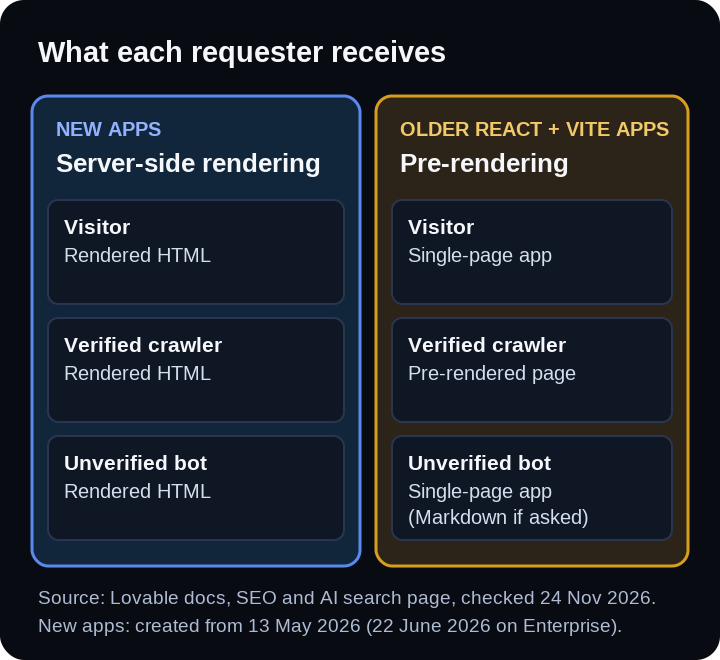
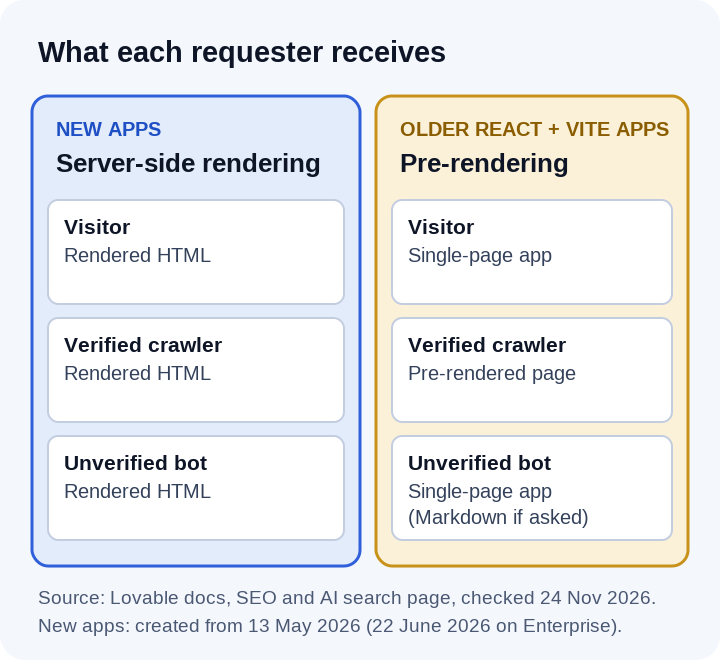
curlcommand take about 10 minutes. - Your builder's own documentation says how it renders pages. Lovable's docs say apps created from 13 May 2026 render on the server. Older Lovable apps are pre-rendered for verified crawlers only. The table below lists what each platform's docs say and where they are silent.
- Fix in this order. Public site on your own domain, no accidental
noindex, content in the HTML the server sends, a unique title and canonical per page, a sitemap, then Search Console. - Google sets no extra requirement for AI answers. A page must be indexed and eligible to show a snippet to be a supporting link. Nothing on this page guarantees a ranking or a citation.
How do I check whether my vibe-coded site is indexed?
Run three tests in this order. Each answers a different question.
Scroll horizontally if columns extend beyond the screen.
| Test | The question it answers | Time |
|---|---|---|
site: search | Does Google show any of my pages? | 2 minutes |
| URL Inspection | What does Google see when it fetches one page? | 5 minutes |
curl | What does my server send before any script runs? | 3 minutes |
Test 1: a site: search
Type site:yourdomain.com into Google with your own domain. Add a phrase from a key page to test it: site:yourdomain.com your phrase. Google's page indexing help gives this syntax and says to search for the exact URL of a page to see whether Google has indexed it.
Treat the result as a hint. Google's Get your website on Google page (last updated 10 December 2025) says: "The site: operator doesn't necessarily return all the URLs that are indexed under the prefix specified in the query." An empty result does not prove a page is missing. Search Console is the check that does.
Test 2: URL Inspection in Search Console
URL Inspection shows what Google sees for one page. Add your site to Search Console first. The tool needs the URL to be inside the property that is open. Google's URL Inspection help lists the steps.
- Paste the full page URL into the search bar at the top of Search Console.
- Read the indexed result. Google says that result is not live: it is "from most recently indexed version of a page, not the live version on the web."
- Click Test live URL. The page must be reachable without a login.
- Look at the screenshot. Google says "A screenshot of the rendered page is available only in a live test."
- Click View tested page and then More info to see the page code. Search it for the same sentence you use in Test 3. If it is missing, Google did not receive that content. If it is there, Test 3 still tells you whether it was in the HTML the server sent.
- If the page is not indexed, read the Page indexing section. Google says it explains "why the page wasn't indexed".
For a vibe-coded site this is the most reliable test. It uses Google's own fetch. Lovable's docs name it as the way to check pre-rendered output: "To check the pre-rendered output yourself, use Google's URL Inspection tool or a social platform's link debugger."
Test 3: what the server sends
curl is a free tool that fetches a page and prints the HTML. It runs no JavaScript. It shows what a client that runs no scripts receives. Open Terminal on a Mac or PowerShell on Windows. Replace the address and the phrase with your own. Pick a short phrase with no apostrophes or symbols, because HTML can write them as codes and give a false 0.
On a Mac, in Terminal:
# 1. Is a phrase from my page in the HTML the server sends? Prints a count.
curl -sL https://yourdomain.com/your-page/ | grep -c -i "a phrase from your page"

# 2. Which title does the server send?
curl -sL https://yourdomain.com/your-page/ | grep -o -i "<title>[^<]*</title>"
On Windows, in PowerShell:
# 1. Prints a count of lines that contain the phrase.
(curl.exe -sL https://yourdomain.com/your-page/ | Select-String -Pattern "a phrase from your page" | Measure-Object).Count

# 2. Which title does the server send?
curl.exe -sL https://yourdomain.com/your-page/ | Select-String -Pattern "<title>[^<]*</title>" | ForEach-Object { $_.Matches.Value }
If the title command prints nothing, open the page source and look for the title. Some sites write it as <title data-rh="true">, which this pattern skips.
The flags -s for silent and -L to follow redirects come from the curl manual.
Chrome's DevTools documentation (last updated 1 March 2019) draws the line this test relies on: "HTML represents initial page content and the DOM represents active, current page content." curl shows the HTML. A browser shows the DOM.
Scroll horizontally if columns extend beyond the screen.
| What you see | What it means | Next step |
|---|---|---|
| Count above 0 | The server sends your content | Go to fixes 4 to 7 below |
| Count 0 on a Lovable app created before 13 May 2026 (22 June 2026 on Enterprise) | Not proof that Google sees nothing. Lovable's docs say unverified bots "see the regular single-page app" | Use Test 2 |
| Count 0 anywhere else | Check the phrase first. If it is right, JavaScript probably adds the content in the browser or the host blocked the request | Go to fix 3 below |
| Same title for every page you test | One set of metadata for the whole site | Go to fix 4 below |
The curl caveat is the one most guides miss. Lovable's docs say pre-rendering "is only served to verified crawlers" and that third-party scanner tools "may report your pages as empty" on older apps. The diagram shows what each requester receives.
My website grader fetches a page over HTTP like curl does. Read a low score on an older Lovable app with the same caution. I have not run it against a Lovable app.
For the developer view of rendering, crawl queues and status codes, read my JavaScript SEO guide for developers.
What do the builders' docs say?
The table lists what each platform's own documentation says, checked on 24 November 2026. A cell that says "not found in the docs" means I searched the pages named in the source line and found nothing. It does not mean the platform lacks the feature.
Scroll horizontally if columns extend beyond the screen.
| Platform | Rendering | Metadata, sitemap and robots.txt | Visibility and domain |
|---|---|---|---|
| Lovable | Apps created from 13 May 2026 (22 June 2026 on Enterprise) "use TanStack Start with server-side rendering". "Older React + Vite apps are pre-rendered for verified crawlers when they request a page." | A robots.txt comes with every new project, "but not always a sitemap". Starting metadata is generic. Older apps "carry one set of metadata for the whole site". | "Only publicly published apps can appear in search results." The docs say to connect a custom domain to build search presence. |
| Bolt | Hosting publishes "pages that are already built as HTML files". It supports single-page apps built with React, Vue or Svelte and Next.js apps with server rendering. What a single-page app sends to crawlers: not found in the docs. | No page on metadata, sitemaps or robots.txt found in the docs. The docs mention an "SEO/GEO" skill and an SEO prompt category but not what they produce. | Public sites: "search engines can find and list it in search results." Custom domains are for Pro users only. |
| v0 | The docs say v0 "defaults to Next.js". The docs list React Server Components among the things v0 can use "for improved performance and SEO". | Not found in the docs. | Every deployment gets a vercel.app URL. Custom domains are set up through Vercel. The first publish asks who can access the app. |
| Replit | Static Deployments "deliver pre-rendered HTML". Replit's docs say they are "not compatible with Replit Apps created using Agent", because Agent builds full-stack apps that need a backend server. How other deployment types render: not found in the docs I read. | SEO Agent can add a robots.txt and a sitemap.xml. A Lighthouse audit runs after every successful publish. SEO Agent needs a paid plan. | The SEO rating runs only for "public web-facing deployment types". |
| Cursor | The docs call it "a coding agent for building ambitious software". Cloud agents can also build and publish web apps: "Cursor handles the hosting, database, auth, and secrets." How those apps render: not found in the docs. | Not found in the docs. | Private and team apps "sit behind Cursor sign-in". Public apps are open to "Anyone with the link". "Public sharing is disabled by default for Teams and Enterprise". Custom domains: not found in the docs. |
Sources: Lovable's SEO and AI search, site metadata and hosting pages. Bolt's hosting, publish publish issues, skills and prompt library pages and its index. The v0 full-stack apps, deployments and custom domain pages (each marked last updated 23 November 2026). Replit's improve your SEO, SEO Rating, SEO Agent and deployment types pages. Cursor's Apps page and docs index. The Lovable and Bolt pages show no date on screen. Their page data gives a modified date of 11 November 2026. I found none for Replit or Cursor. Docs change, so check the date on any copy you read later.
Vercel, which makes v0, published a blog post on 2 May 2025 and modified it on 3 March 2026. It says: "Your deployed websites are server-rendered by default, with full HTML returned at the time of the request". That is a vendor's marketing post, not documentation. It does not replace Test 2 and Test 3 on your own site.
Lovable's docs also say ranking still depends on "content quality, search intent, backlinks, competition, performance, and search ranking algorithms". A platform that renders pages well does not rank them for you.
Which fixes come first?
These eight fixes are in order of effect. Fixes 1 to 3 remove what can stop a page being indexed. Fixes 4 to 8 help Google find and understand it. Each prompt is written for you to paste into your builder.
1. Make the site public on a domain you own
An unpublished or private site cannot appear in search. Lovable's docs say only publicly published apps can. Bolt's docs say a private site cannot be found or listed by search engines. Lovable's docs say a lovable.app address suits MVPs, demos and projects driven mainly by social or paid traffic. Buy or connect your own domain and publish to it.
2. Remove accidental noindex and robots.txt blocks
Lovable's docs give these among their examples of high-impact findings: "A noindex tag on every page" and "A robots.txt file that blocks crawlers on a live site". Google's noindex guide (updated 10 December 2025) says noindex drops the page from results. It also says a page blocked by robots.txt never has its noindex read. Its robots.txt introduction (updated 10 December 2025) says robots.txt is "not a mechanism for keeping a web page out of Google".
Search the whole project for any noindex robots tag or header and for any
robots.txt Disallow rule. List each match with the file name and the reason
it exists. Do not delete anything yet.
Open yourdomain.com/robots.txt yourself too. A rule of Disallow: / blocks the whole site.
3. Get the content into the HTML the server sends
Google's JavaScript SEO basics (updated 4 March 2026) says crawling works well "for classical websites or server-side rendered pages where the HTML in the HTTP response contains all content". Pages built from an app shell need Google to run the JavaScript first. Google says the page "may stay on this queue for a few seconds, but it can take longer than that". Lovable's docs add that on older apps "Content that loads late may be missing" from the pre-rendered page.
Change this project so the content of every public page is in the HTML the
server sends before any JavaScript runs. Use server-side rendering or
prerendering for every public route. Then show me the exact command to check
it for the /about page.
On Lovable the docs say an existing project can be upgraded to TanStack Start, "which gives it full server-side rendering". On Bolt the docs say hosting publishes pages already built as HTML files. Bolt's own prompt for server-rendered frameworks asks for "SPA mode or prerendering". Only prerendering puts your content in the HTML, so ask for prerendering. Run Test 3 again after the change.
4. Give every page its own title, description and canonical
Lovable's review lists "Duplicate titles, placeholder text, weak descriptions, or wrong canonical URLs" as common findings. Replit's best-practice list says: "Give every page a unique title and meta description."
Give every public page its own title, meta description and canonical URL.
Write each from that page's content. The canonical must be the full address
of the page itself on my own domain. Show me the title of each page when done.
5. Return a real 404 for pages that do not exist
Single-page app hosts often use a catch-all rule such as /* /index.html 200. Bolt's docs give that rule as the fix when pages other than home show "Page not found". A rule like that sends a 200 for any address. Google says that with client-side routing, "using meaningful HTTP status codes can be impossible or impractical". Its JavaScript SEO basics and JavaScript troubleshooting guide (updated 18 December 2025) tell you to prevent soft 404 errors in single-page apps. Both are sourced facts. The test is yours to run.
On a Mac, in Terminal:
curl -s -o /dev/null -w "%{http_code}\n" https://yourdomain.com/this-page-does-not-exist/
On Windows, in PowerShell:
curl.exe -s -o NUL -w "%{http_code}" https://yourdomain.com/this-page-does-not-exist/
A result of 404 is the pass. My redirect checker shows the status code for any URL without a terminal.
Make any address that is not a real page show a not-found page and return
HTTP status 404. If my host cannot do that for a single-page app, tell me.
6. Add a sitemap and a robots.txt
Google's sitemaps overview (updated 10 December 2025) says "A sitemap helps search engines discover URLs on your site, but it doesn't guarantee that all the items in your sitemap will be crawled and indexed." Google lists a new site with few external links as one that may need one. Lovable's review flags sitemaps that list "placeholder routes or relative URLs".
My sitemap generator reads the HTML a server returns and follows its links. It leaves out pages with a noindex or a canonical that points elsewhere. My robots.txt generator builds the file with a Sitemap: line.
Create a sitemap.xml that lists the full https address of every public page
on my own domain. Create a robots.txt that allows all pages and ends with a
Sitemap: line pointing to it. Do not list placeholder or draft routes.
7. Verify the site in Search Console and request indexing
Submit the sitemap in Search Console. Use URL Inspection to request indexing for your most important pages. Lovable's docs advise "Request indexing for new or updated priority pages." They also say: "New pages can take days, and sometimes longer." Requesting indexing does not guarantee it.
8. Link every page from another page
The same sitemaps overview says that if a site's pages are properly linked, Google "can usually discover most of your site". Make sure each page you want found has a link to it from the home page or a hub page.
List every public page that has no link to it from another page on the site.
Add a link to each from the most relevant page. Use plain descriptive link text.
What do AI assistants need from a vibe-coded site?
They need to be allowed in and to receive your content. Google, OpenAI, Anthropic and Perplexity each document a route in.
Scroll horizontally if columns extend beyond the screen.
| Crawler | What its own page says | Source |
|---|---|---|
| Google AI Overviews and AI Mode | To be a supporting link, a page "must be indexed and eligible to be shown in Google Search with a snippet". "There are no additional requirements to appear in AI Overviews or AI Mode." | Google AI features, updated 10 December 2025 |
| OpenAI (ChatGPT search) | OAI-SearchBot "is used to surface websites in search results in ChatGPT's search features". Sites opted out of it "will not be shown in ChatGPT search answers". They "can still appear as navigational links". OpenAI also recommends allowing requests from its published IP ranges. | OpenAI crawlers |
| Anthropic (Claude) | Disabling Claude-SearchBot "may reduce your site's visibility and accuracy in user search results". | Anthropic crawlers |
| Perplexity | Perplexity says "To ensure your site appears in search results, we recommend allowing PerplexityBot in your site's robots.txt file and permitting requests from our published IP ranges". | Perplexity crawlers |
Three steps follow from those pages. Check that your robots.txt does not block these crawlers. Check that the page is indexed in Google. Check that the content is in the server HTML. If a firewall or bot rule sits in front of your site, check that it lets the published crawler IP ranges through.
The OpenAI, Anthropic and Perplexity pages do not say whether their crawlers run JavaScript. A Vercel and MERJ study published on 17 December 2024 found that "none of the major AI crawlers currently render JavaScript". It tested OAI-SearchBot, ChatGPT-User, GPTBot, ClaudeBot and PerplexityBot among others, not Claude-SearchBot. It reported that Gemini and AppleBot do render JavaScript. The data is almost two years old. Vercel also provides v0. Treat the study as one vendor's measurement. Content in the server HTML does not depend on the answer.
Lovable's docs say its verified crawlers include those of ChatGPT, Perplexity, Claude and Gemini, and that "Any client that asks for Markdown gets a Markdown version of the page". Those are platform features. I cannot confirm them on your site without a test.
Two things I do not recommend as a way to be cited. An llms.txt file is one: Lovable's docs say "Lovable does not require llms.txt". Schema markup is the other. None of the four crawler pages above lists either as a requirement.
How other sites describe your business is a separate question. No crawler page above says it decides citations. I treat a consistent description elsewhere as a sensible supporting step, not a documented rule. My guide to a brand not appearing in ChatGPT covers how I check it.
Vibe-coded site SEO checklist
Run this list on the home page and one inner page.
Scroll horizontally if columns extend beyond the screen.
| # | Check | How to test | Pass |
|---|---|---|---|
| 1 | The site is public | Open it in a private browser window | Loads without a login |
| 2 | It runs on your own domain | Read the address bar | Your domain, not the builder's |
| 3 | No noindex | Search the project and view the HTML | No noindex on pages you want found |
| 4 | robots.txt allows crawling | Open /robots.txt | No Disallow: / |
| 5 | Content is in the server HTML | curl with grep -c | Count above 0 (see the Lovable caveat) |
| 6 | Each page has its own title | curl with grep -o | A different title per page |
| 7 | Each page has a self-referencing canonical | URL Inspection, indexed result | Google's chosen canonical matches your address |
| 8 | A missing URL returns 404 | curl -w "%{http_code}" | 404 |
| 9 | A sitemap exists and lists real pages | Open /sitemap.xml | Full addresses of live pages only |
| 10 | Search Console is verified and the sitemap is submitted | Search Console, Sitemaps report | Status shows Success: fetched and read without errors |
| 11 | Google can render the page | URL Inspection live test, screenshot | Screenshot shows your content |
| 12 | Every page is linked from another page | Compare the sitemap with your menus | No orphan pages |
If you want the checks run for you, my technical SEO audit is a fixed £495 for a standard site of up to around 500 pages. My AI visibility audit is a fixed £795 and checks whether AI assistants can read, verify and cite your website.