


JavaScript SEO is the work of making sure crawlers receive your content, links and metadata when JavaScript builds the page. This guide gives you the tests and the fixes for React, Next.js and Astro sites. Each Google, framework and AI crawler source linked below was checked on 23 November 2026.
At a glance
- Google renders JavaScript after a queue. Googlebot fetches the HTML first. A headless Chromium runs the scripts once Google's resources allow.
- Test two versions of each page template.
curlshows the HTML your server sends. The URL Inspection tool shows the HTML after Google renders it. - Put content, links, the title, the canonical and the robots tag in the server HTML. Google's own guide says "not all bots can run JavaScript".
- Give every view a real URL and a real status code. Use
<a href>links with the History API. Return a 404 for a missing page. - AI crawler documentation is silent on JavaScript. The OpenAI, Anthropic and Perplexity crawler pages do not say whether their bots run scripts. Build as if those bots read the server HTML only.
How does Google process JavaScript?
Google processes a JavaScript page in three phases: crawling, rendering and indexing. Googlebot fetches the HTML and reads the links in it. The page then waits in a render queue until a headless Chromium runs the JavaScript. Google indexes the rendered HTML.
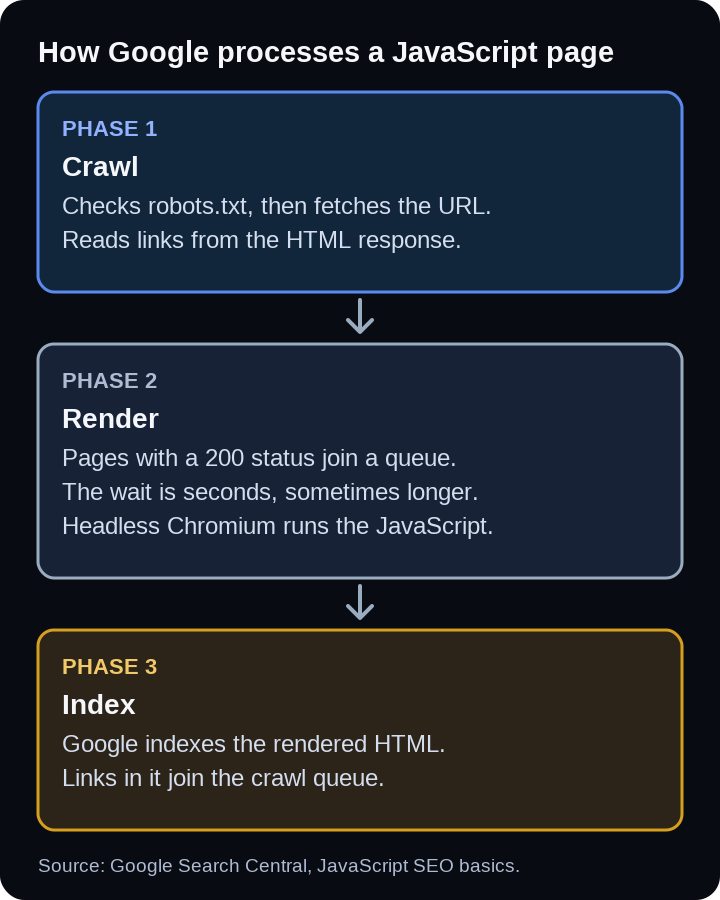
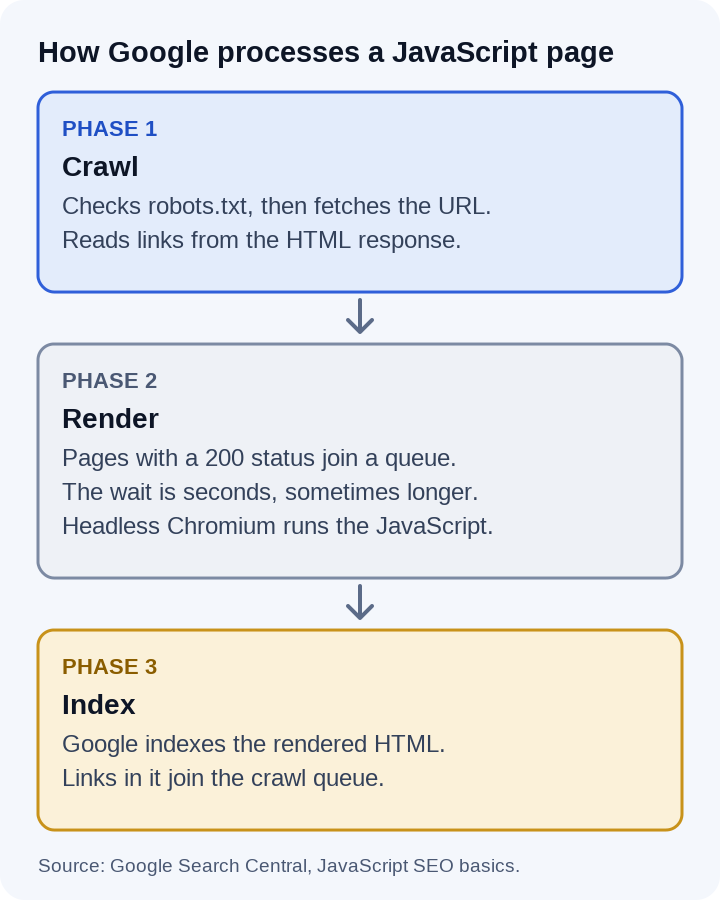
Google describes the pipeline in Understand the JavaScript SEO basics. The page was last updated on 4 March 2026. Five details in it change how you build a page.
Scroll horizontally if columns extend beyond the screen.
| Detail | Google's wording | What to do |
|---|---|---|
| robots.txt is checked first | "Google Search won't render JavaScript from blocked files or on blocked pages." | Keep script and style files crawlable. |
| Links are read twice | Googlebot reads href links in the HTML response. It reads them again in the rendered HTML. | Put navigation links in the server HTML. |
| The queue has no fixed length | "The page may stay on this queue for a few seconds, but it can take longer than that." | Plan for a delay you cannot measure. |
| An error status can stop rendering | "If the HTTP status code is non-200 (for example, on error pages with 404 status code), rendering might be skipped." | Return the right status code from the server. |
A noindex can stop rendering | "When Google encounters the noindex tag, it may skip rendering and JavaScript execution" | Never send noindex in the HTML with a plan to remove it by script. |
Google's renderer also behaves differently from a browser with a person using it.
- The renderer does not click, scroll or type. Google's lazy-loading guide says "Google Search does not interact with your page".
- The renderer keeps no state between page loads. Local Storage, Session Storage and cookies are cleared.
- Googlebot declines permission requests. Content that requires camera access is out of reach for Googlebot.
- Googlebot does not open WebSocket or WebRTC connections. Content needs an HTTP fallback.
- Googlebot stops reading each file at 2MB. The limit applies to the HTML and to each JavaScript and CSS file separately. Google measures it on uncompressed data.
Sources: Google's JavaScript troubleshooting guide (updated 18 December 2025), its lazy-loading guide and its Googlebot reference (updated 3 February 2026).
How do I test what Googlebot sees?
Run three checks on one URL from each page template. Fetch the raw HTML with curl. Read the rendered HTML in Search Console. Compare the two versions.
Check 1: fetch the raw HTML with curl
curl is a data transfer tool. Its output is the response your server sends. A crawler that skips JavaScript receives this version of the page.
# 1. Is the main content in the server response? Prints the number of matching lines.
curl -sL https://example.com/your-page/ | grep -c -i "a phrase from your main content"

# 2. Which title, canonical and robots tags does the server send?
curl -sL https://example.com/your-page/ | grep -o -i -E '<title>[^<]*</title>|<link[^>]*rel="canonical"[^>]*>|<meta[^>]*name="robots"[^>]*>'

# 3. Which status code does a missing page return?
curl -s -o /dev/null -w "%{http_code}\n" https://example.com/this-page-does-not-exist/
A count of 0 from the first command means JavaScript adds that content in the browser. The second command prints the tags that exist before any script runs. The third command should print 404.
curl shows the server response only. The output says nothing about what Google renders. My redirect checker reports the status code and each redirect hop for a URL in the browser. The flags come from the curl manual.
Check 2: read the rendered HTML in Search Console
The URL Inspection tool shows the page after Google's renderer has run the JavaScript.
- Type the full URL into the inspection search bar at the top of Search Console.
- Click Test live URL.
- Click View tested page.
- Search the rendered HTML for the same phrase you used with
curl. - Open the screenshot and the JavaScript console output.
Google's URL Inspection help page lists what the live test returns: "a screenshot of the rendered page, the raw HTML returned, the HTTP headers, JavaScript console output, and any page resources loaded". Google's troubleshooting guide names the Rich Results Test as a second tool for the same check.
Check 3: compare the two versions
The two outputs differ wherever JavaScript changed the page.
Chrome's DevTools documentation puts the difference in one sentence: "HTML represents initial page content and the DOM represents active, current page content." The curl output is the HTML. The Elements panel in DevTools shows the DOM.
Scroll horizontally if columns extend beyond the screen.
| Test | What it shows | What it cannot show |
|---|---|---|
curl | The server HTML and the status code | Anything JavaScript adds |
| URL Inspection live test | The rendered HTML, a screenshot, console output and loaded resources | What other search engines or AI crawlers receive |
| DevTools Elements panel | The DOM in your own browser | What Google renders. Your browser keeps cookies and storage. Google's renderer clears them. |
Everything search needs belongs in the curl output.
Which rendering mode should I use?
Use static generation or server-side rendering for every page that should be found in search. Both modes put the full content in the first HTML response. Client-side rendering suits views behind a login.
Scroll horizontally if columns extend beyond the screen.
| Mode | First HTML response | Crawlers that skip JavaScript | Core Web Vitals | |
|---|---|---|---|---|
| Client-side rendering (CSR) | An app shell without the content | Content exists only after the render phase | Receive no content | "Client-side rendering can be difficult to make and keep fast for mobile devices." |
| Server-side rendering (SSR) | Full HTML built for each request | Content and links are in the crawled HTML | Receive the content | "Server-side rendering generally produces a fast FCP." |
| Static generation (SSG) | Full HTML built ahead of the request | Content and links are in the crawled HTML | Receive the content | A fast FCP and "a consistently fast TTFB" |
| Incremental static regeneration (ISR) | Full HTML from a cached prerender | Content and links are in the crawled HTML | Receive the content. The copy can be stale until Next.js regenerates it. | Requests are "cached and instantaneous" |
| Streaming SSR | HTML sent in chunks after a 200 status | Next.js says streaming "does not impact SEO" because the server renders it | Receive the streamed HTML | The status code is fixed when the first chunk leaves |
| Islands (Astro) | Full HTML for every component | Content and links are in the crawled HTML | Receive the content. client:only components are the exception. | "Less client-side JavaScript to slow your site down" |
| Dynamic rendering | A different response for each user agent | Google calls it "a workaround and not a recommended solution" | Receive the prerendered copy when the server detects them | Adds a rendering server to run |
Sources: web.dev's Rendering on the web (updated 5 January 2026), the Next.js ISR guide and loading.js reference, Astro's islands page and Why Astro page and Google's dynamic rendering page.
Google titles that last page "Dynamic rendering as a workaround". It recommends server-side rendering, static rendering or hydration in its place.
Rendering mode affects Core Web Vitals too. A page passes when it meets all three targets at the 75th percentile of page loads.
Largest Contentful Paint: good at or under this value
Interaction to Next Paint: good at or under this value
Cumulative Layout Shift: good at or under this value
The thresholds come from web.dev's Web Vitals article. My speed checker runs a lab test on any URL. It reports LCP, CLS and Total Blocking Time.
Nine JavaScript SEO faults and their fixes
These nine faults cover most of what goes wrong on a JavaScript site. Each fault has a test from the section above and a short fix.
1. Content arrives only after a client fetch
Fault. The server sends an app shell. A script fetches the content in the browser. Google has to render the page to see that content. A crawler that skips JavaScript never sees it.
Fix. Fetch the data on the server. Pages and layouts are Server Components by default in the Next.js App Router.
// app/products/[id]/page.tsx
export default async function ProductPage({
  params,
}: {
  params: Promise<{ id: string }>
}) {
  const { id } = await params
  const product = await fetch(`https://api.example.com/products/${id}`).then(
    (res) => res.json()
  )

  return (
    <main>
      <h1>{product.name}</h1>
      <p>{product.description}</p>
    </main>
  )
}
The product name and description are now in the HTML response. The pattern follows the Next.js Server and Client Components guide.
2. Links have no href
Fault. Navigation runs through click handlers. Google says it can generally only crawl a link that is an <a> element with an href attribute.
Scroll horizontally if columns extend beyond the screen.
| Markup | Google's verdict |
|---|---|
<a href="/products/shoes"> | Recommended |
<a href="/products/shoes" onclick="goTo('shoes')"> | Recommended |
<a onclick="goto('/products/shoes')"> | Not recommended |
<span href="/products/shoes"> | Not recommended |
<a href="javascript:goTo('shoes')"> | Not recommended |
The examples are adapted from the list in Google's link guidance.
Fix. Render a real anchor and let the router handle the click.
import Link from 'next/link'

// Renders <a href="/products/shoes">. A crawler can extract the URL.
<Link href="/products/shoes">Shoes</Link>

// No href. A crawler has no URL to extract.
<span onClick={() => (window.location.href = '/products/shoes')}>Shoes</span>
3. The title, canonical or robots tag is set in the browser
Fault. Google can read a title or canonical that JavaScript sets at render time. Three risks remain.
- A crawler that skips JavaScript reads only the tags in the server HTML.
- A canonical that JavaScript changes gives Google two answers. Google says conflicting canonical tags "may lead to unexpected results".
- A
noindexin the server HTML may stop Google rendering the page. A script cannot reliably remove it.
Fix. Send the final tags in the server HTML. Google's canonical guidance says the best way is to specify the canonical in the HTML source and leave it unchanged by JavaScript.
<head>
  <title>Blue running shoes | Example Shop</title>
  <link rel="canonical" href="https://example.com/products/blue-running-shoes/">
</head>
The Next.js way to produce these tags is in the framework notes below.
4. Missing pages return 200
Fault. A single-page app answers every URL with the same shell and a 200 status. Google calls the result a soft 404. Its guide says meaningful status codes "can be impossible or impractical" with client-side routing.
Fix. Google gives two strategies for that case. Pick one.
const res = await fetch(`/api/products/${id}`)

if (res.status === 404) {
  // Strategy 1: move to a URL where the server returns a real 404
  window.location.href = '/not-found'

  // Strategy 2: stay on the URL and add a noindex robots tag
  // const meta = document.createElement('meta')
  // meta.name = 'robots'
  // meta.content = 'noindex'
  // document.head.appendChild(meta)
}
A server-rendered route is simpler. The server checks the data first and returns the 404 status itself.
5. Routes live after a hash
Fault. Views load from fragments such as https://example.com/#/products. Google's troubleshooting guide says the AJAX-crawling scheme has been deprecated since 2015. Fragment routes cannot be relied on with Googlebot.
Fix. Route with the History API and real paths. The server must answer each path directly.
// Fragment route. Googlebot cannot rely on it.
// https://example.com/#/products

// History API route. /products is a real URL.
history.pushState({}, '', '/products')
MDN documents the method on its History.pushState() page.
6. Lazy-loaded content waits for a scroll or a click
Fault. Content loads from a scroll handler or a "Show more" button. Google's renderer does not scroll or click.
Fix. Load content when it enters the viewport. Google lists browser lazy-loading and the IntersectionObserver API as suitable methods.
<!-- Images: the browser decides when to load. No scroll handler. -->
<img src="/images/size-chart.png" alt="Size chart" loading="lazy" width="800" height="450">
// Other content: load when the placeholder enters the viewport
const observer = new IntersectionObserver((entries) => {
  for (const entry of entries) {
    if (entry.isIntersecting) {
      loadReviews(entry.target)
      observer.unobserve(entry.target)
    }
  }
})

observer.observe(document.querySelector('#reviews'))
Confirm the result in the URL Inspection tool. The content should appear in the rendered HTML. MDN documents loading="lazy" on its img element page and the observer on its IntersectionObserver page.
7. robots.txt blocks JavaScript or CSS
Fault. A rule written to hide build folders also blocks the files Google needs for rendering.
# These rules stop Google rendering any page that needs the blocked files
User-agent: *
Disallow: /assets/
Disallow: /static/js/
Fix. Remove the rules for script and style files. Google's robots.txt introduction says not to block resources when their absence makes the page harder to understand. My robots.txt generator builds a clean file to start from.
8. Structured data is injected late
Fault. A script or a tag manager adds JSON-LD after load. Google can process structured data that is in the DOM when it renders the page. Two limits apply. A crawler that skips JavaScript never sees the markup. Google also warns that JavaScript-generated Product markup "can make Shopping crawls less frequent and less reliable".
Fix. Output the JSON-LD in the server HTML.
<script type="application/ld+json">
{
  "@context": "https://schema.org",
  "@type": "Article",
  "headline": "JavaScript SEO for developers",
  "datePublished": "2026-11-23"
}
</script>
Google covers both routes in Generate structured data with JavaScript. My schema validator checks JSON-LD syntax and properties from pasted code or a URL.
9. Infinite scroll has no paginated URLs
Fault. New items load as the user scrolls. Items beyond the first batch have no URL of their own.
Fix. Google's lazy-loading guide sets out four rules.
- Give each chunk its own persistent URL such as
?page=2. - Show the same content on that URL every time it loads.
- Link the chunk URLs in sequence with
<a href>. - Update the address bar with the History API as each chunk becomes the main visible content.
<!-- A crawlable link to the next chunk sits below the list -->
<a href="/blog/?page=2">Next page</a>
Framework notes for Next.js, React and Astro
Next.js and Astro put content in the first HTML response by default. A React app built without a framework sends an app shell until you add server rendering or prerendering.
Next.js App Router
Layouts and pages are Server Components by default. Client Components are prerendered to HTML too. A 'use client' file still sends markup in the first response.
Set metadata with the metadata object or the generateMetadata function. Both work in Server Components only.
// app/products/[id]/page.tsx
import type { Metadata } from 'next'

type Props = { params: Promise<{ id: string }> }

export async function generateMetadata({ params }: Props): Promise<Metadata> {
  const { id } = await params
  const product = await fetch(`https://api.example.com/products/${id}`).then(
    (res) => res.json()
  )

  return {
    title: product.name,
    description: product.summary,
    alternates: { canonical: `/products/${id}` },
  }
}
The relative canonical needs metadataBase. The docs say it is typically set in the root layout.
// app/layout.tsx
import type { Metadata } from 'next'

export const metadata: Metadata = {
  metadataBase: new URL('https://example.com'),
}
Two behaviours in the current docs deserve a test on your own build.
Streaming metadata. The metadata is in the initial HTML when the page can be prerendered. Next.js can stream it later on other pages. Streamed tags are appended to the <body>. Next.js sends them in the <head> for user agents on its HTML-limited bot list. The default list on the Next.js canary branch named Bingbot, Applebot, facebookexternalhit, Twitterbot and others on 23 November 2026. It did not name GPTBot, OAI-SearchBot, ClaudeBot or PerplexityBot. The htmlLimitedBots option changes the list. A custom value replaces the default list. The docs warn that overriding it could lead to longer response times. This setting turns streaming metadata off for every user agent:
// next.config.ts
import type { NextConfig } from 'next'

const config: NextConfig = {
  htmlLimitedBots: /.*/,
}

export default config
Streamed 404s. notFound() renders the not-found UI and adds a noindex robots tag. A streamed response has already started with a 200 status. The docs say the tag "prevents search engines from indexing that URL even if the HTTP status is 200". Run the check before streaming starts when you need a real 404 status. The sources are the generateMetadata reference (updated 18 November 2026), the notFound reference and the loading.js reference.
robots.ts and sitemap.ts in the app folder generate the two crawler files.
// app/robots.ts
import type { MetadataRoute } from 'next'

export default function robots(): MetadataRoute.Robots {
  return {
    rules: { userAgent: '*', allow: '/' },
    sitemap: 'https://example.com/sitemap.xml',
  }
}
// app/sitemap.ts
import type { MetadataRoute } from 'next'

export default function sitemap(): MetadataRoute.Sitemap {
  return [
    { url: 'https://example.com', lastModified: new Date() },
    { url: 'https://example.com/products', lastModified: new Date() },
  ]
}
Both file conventions are in the Next.js robots.txt and sitemap.xml references.
React without a framework
The React docs recommend starting a new app with a framework. Most build tools produce a single-page app by default. The docs describe that as one HTML page that updates as the user interacts with it.
React Router's framework mode has three rendering strategies: client-side rendering, server-side rendering and static pre-rendering. One config file sets them.
// react-router.config.ts
import type { Config } from "@react-router/dev/config";

export default {
  ssr: true,
  prerender: ["/", "/pricing", "/blog"],
} satisfies Config;
ssr: false produces a single-page app. prerender writes static HTML for the listed paths at build time. The options are documented in React Router's rendering strategies and pre-rendering pages.
React also places a <title> rendered by any component into the document head. That happens in the browser in a client-rendered app. Run the curl test to see which title the server sends. The React sources are Creating a React App, Build a React app from scratch and the title component reference.
Astro
Astro prerenders pages to static HTML at build time by default. It renders every UI component to HTML and CSS and strips the client-side JavaScript. A client:* directive turns a component into an interactive island.
---
import Reviews from '../components/Reviews.jsx'
---

<!-- HTML is in the response. JavaScript hydrates it on page load. -->
<Reviews client:load />

<!-- No HTML in the response. The component renders in the browser only. -->
<Reviews client:only="react" />
client:only is the directive to watch. Astro's directives reference says it "skips HTML server rendering, and renders only on the client". Keep anything that should be found in search out of client:only components.
Astro's sitemap integration needs the site option.
// astro.config.mjs
import { defineConfig } from 'astro/config';
import sitemap from '@astrojs/sitemap';

export default defineConfig({
  site: 'https://example.com',
  integrations: [sitemap()],
});
The build then writes sitemap-index.xml and sitemap-0.xml. Pages rendered on demand need a server adapter. Astro's docs call that mode server-side rendering. The sources are Astro's on-demand rendering guide and sitemap integration guide.
Moving a site to a new framework
A framework move changes templates, URLs and metadata in one release. Run the three checks above on the staging build before launch.
I moved my own consultancy site from WordPress to a rebuilt Next.js site on 20 February 2026. Google Search Console recorded 18 clicks from 12,998 impressions from 1 July 2025 to 19 February 2026. It recorded 506 clicks from 397,107 impressions from 20 February to 28 October 2026. The rebuild also added new content. The gain comes from the platform and the content together. Source: Google Search Console on 31 October 2026.
My SEO migration service covers the URL map, the redirects and the launch checks for a move like this.
What can AI crawlers see?
AI crawlers can read whatever is in your first HTML response. Their own documentation does not say whether they run JavaScript. One published measurement from December 2024 found that they did not.
Scroll horizontally if columns extend beyond the screen.
| Operator | Crawlers its documentation names | What the page says about JavaScript |
|---|---|---|
| OpenAI | OAI-SearchBot, OAI-AdsBot, GPTBot, ChatGPT-User | Nothing |
| Anthropic | ClaudeBot, Claude-User, Claude-SearchBot | Nothing |
| Perplexity | PerplexityBot, Perplexity-User | Nothing |
| Google AI Overviews and AI Mode | Google's own index | "There are no additional requirements" beyond being indexed and eligible for a snippet. Google's indexing pipeline renders JavaScript. |
| Microsoft Bing | Bingbot | A 2018 post says Bingbot "is generally able to render JavaScript" with limits. A 2019 post says it renders with Microsoft Edge. |
Sources read on 23 November 2026: OpenAI's crawler overview, Anthropic's crawler article, Perplexity's crawler page, Google's AI features page and the Bing Webmaster Blog posts of 31 October 2018 and 9 October 2019.
The measurement is The rise of the AI crawler by Vercel and MERJ. Vercel published it on 17 December 2024. The authors monitored nextjs.org and the Vercel network. They checked the results against two job board sites. Their finding: "none of the major AI crawlers currently render JavaScript". ChatGPT's and Claude's crawlers fetched JavaScript files without executing them.
Read that study with three limits in mind.
- The data is almost two years old.
- Vercel maintains Next.js. Treat the study as a vendor's measurement.
- The study excluded Microsoft Copilot because it had no unique user agent to track.
The curl test from earlier settles the question for your own site. Content in that output reaches every crawler that requests the page. Content missing from it depends on each crawler running your JavaScript. None of the three AI operators above documents that it does.
If an AI app builder such as Lovable, Bolt or v0 made the site, my vibe-coded website SEO guide walks through these tests without code.
Pre-launch checklist
Run this list on one URL from each template before a JavaScript site goes live.
Scroll horizontally if columns extend beyond the screen.
| # | Check | How to test | Pass |
|---|---|---|---|
| 1 | Main content is in the server HTML | curl with grep -c | Count above 0 |
| 2 | Title, canonical and robots tags are in the server HTML | curl with grep -o | One title and one canonical. No stray noindex. |
| 3 | A missing URL returns 404 | curl -w "%{http_code}" | 404 |
| 4 | Internal links are <a href> elements | Search the server HTML for <a | Every navigation link has an href |
| 5 | No route depends on a fragment | Look for #/ in URLs | None |
| 6 | The rendered HTML holds the content | URL Inspection live test | Phrase found |
| 7 | Rendering raises no errors | Console output in the live test | No errors that remove content |
| 8 | robots.txt allows JavaScript and CSS | Read /robots.txt | No Disallow on script or style paths |
| 9 | Lazy content loads without a scroll or click | Rendered HTML in the live test | Content and image src values present |
| 10 | Infinite scroll has paginated URLs | Open ?page=2 directly | Same content on every load |
| 11 | Structured data is in the server HTML | curl with grep -c "application/ld+json" | Count above 0 |
| 12 | The sitemap lists canonical URLs | Open the sitemap file | Each URL matches its page's canonical |
| 13 | Core Web Vitals meet the targets | Field data at the 75th percentile | LCP 2.5 s, INP 200 ms and CLS 0.1 or better |
My technical SEO audit runs these checks across a whole site. The audit is £495 fixed for a standard site. A site with complex JavaScript rendering gets its own scope and price first.