


Google's helpful content documentation now explains what counts as a page's main content and how quality raters assess it. Marie Haynes flagged the addition on 2 October. I've compared the current page with a 28 September archived copy, then turned the guidance into a page check you can use on a calculator, recipe, service page or review.
What changed in Google's documentation?
The Google page carries a 1 October 2026 update date. In the 28 September archived version, the section headed "Main content" was absent. The current version adds that section, including a definition, examples and four attributes raters use when judging the work. It also adds a paragraph warning against fabricated author profiles. The comparison establishes what changed between those two captures; the footer date alone does not prove when each sentence was edited.
The public Search Quality Rater Guidelines PDF I checked still shows 11 September 2025 as its latest revision. Its section 2.4.1 already defines main content, and section 3.2 already discusses effort, originality, talent or skill, and accuracy. Google has brought those ideas into documentation written for creators. It has not announced a new rater PDF in this change.
There is another limit to keep in mind. Google says rater data is not used directly in its ranking algorithms. Raters help it judge whether its systems return useful results. The new text gives site owners useful guidance for improving their pages. My E-E-A-T explainer covers that distinction in more detail.
Find the part that does the job
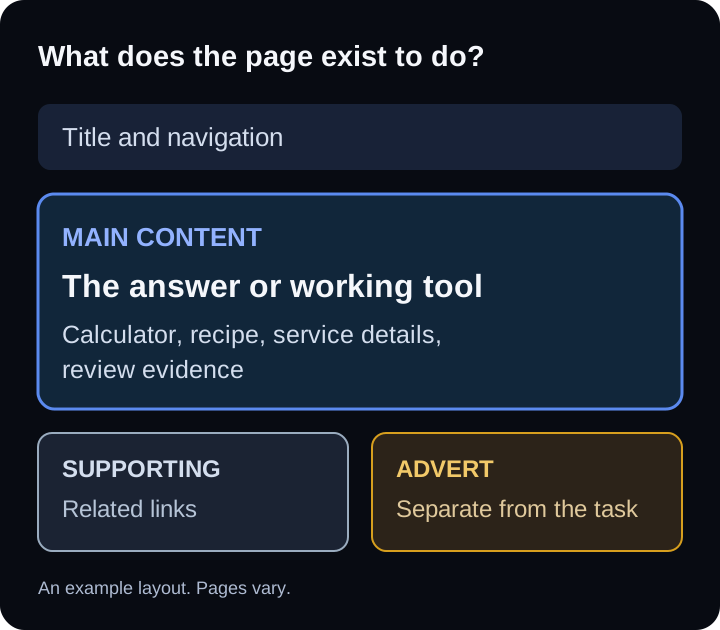
Google defines main content as the part of a page that directly helps it achieve its purpose. That can be text, images, audio, video, a tool, a discussion, or details inside a tab. The visible title and headings can be part of it too. A page can have several types of main content at once.
Scroll horizontally if columns extend beyond the screen.
| Visitor came to... | Look for... |
|---|---|
| Calculate a cost | A working calculator and clear inputs |
| Cook a dish | Ingredients, method and useful notes |
| Choose a service | Scope, process and a way to enquire |
| Judge a product | Testing evidence and a clear verdict |
For a calculator page, the working calculator and an explanation of its inputs and result do the job. A long introduction that delays the tool does little for someone who came to calculate. For a recipe page, the ingredients, method and useful preparation notes matter more than a long story before them. For a service page, a visitor needs to understand the service, who it suits, what happens next and how to enquire. For a product review, testing evidence and a clear judgement are central; an affiliate button doesn't replace either.
I would open each page on a phone and ask someone unfamiliar with the site to point to the thing they came for. If they have to scroll through banners or repeated introductions first, move the useful part higher. I use this as a practical editorial test when reviewing pages. On an important service page, my technical SEO audit can also check whether layout and indexing problems keep that content from being found.
Four questions to ask about the work itself
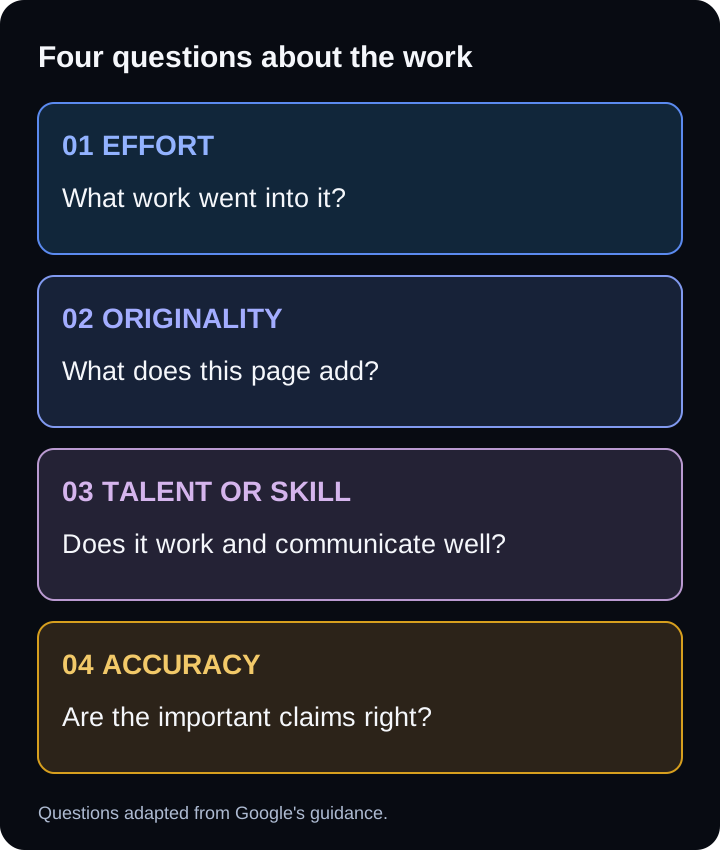
The added section names effort, originality, talent or skill, and accuracy. Assess these qualities in the work that helps the page fulfil its purpose.
Effort: What human work created the page or the system behind it? A tool may involve substantial work even when its on-page text is short. Google gives original analysis, manual translation and a custom interactive map as examples. It contrasts those with pages generated automatically from feeds and large amounts of AI text produced without manual oversight or curation. Crediting a source does not itself supply original effort. I would keep notes on the testing, research, editing or development behind valuable pages, then show the useful result on the page.
Originality: What can this page offer that a visitor will not find in the same form elsewhere? A service page can explain a real process and the decisions involved. A product review can show the test conditions, failures and trade-offs. A recipe can explain what changed in testing and why. Rephrasing another page with a different introduction is a weak answer to this question.
Talent or skill: Does the result work and communicate well? The skill in a calculator appears in its logic, labels and handling of awkward inputs. In a tutorial it appears in the sequence and clarity of the instructions. Google explicitly says specialist expertise is not needed for every subject. A person's first-hand account of clearing snow can be useful without a formal credential.
Accuracy: Are the facts correct, and could an important mistake harm someone? Google calls for factual accuracy on informational pages and a higher standard, consistent with established expert consensus, for topics that can significantly affect health, finances or safety. I would check dates, quantities, claims and outbound sources when publishing, then repeat that check when the subject changes. My free website grader can catch some technical issues, but it cannot verify the truth of a product test or a health claim.
AI content and honest authorship
The new wording does not say every use of AI is low effort. Its example is large amounts of generated text without manual oversight or curation. A person who checks primary sources, corrects errors, adds direct experience and takes responsibility for the final page is doing different work from someone publishing an untouched batch. The page still has to be useful and accurate. A disclosure alone cannot repair poor content.
The added authorship paragraph is unusually direct. Google describes AI headshots, made-up names and false credentials used to make content appear written by human experts as deception. If the author is a business, say who at the business made or reviewed the page where readers would reasonably expect to know. If several people contributed, describe their actual roles. Do not invent a medical reviewer for a health article or a tester for a product that nobody tested.
I write here under my own name, Sunny Patel. Where a page describes work I did, I should be able to show the method and correct it when a reader finds an error. That is a more useful authorship test than whether a bio box looks polished.
Run a page check
Pick one important landing page. Use a page that already gets search impressions, enquiries or sales, or one you expect customers to rely on. Open it on a phone, then work through these questions in order:
- Name its job in one sentence. Is the visitor trying to calculate, learn, compare, book or buy? If the page tries to serve several unrelated jobs, decide which one owns the page.
- Find the main content. Mark the answer, tool, method, service details or review evidence. Check that it works and that a visitor can reach it without pushing through unnecessary material. Treat supporting navigation and ads separately.
- Ask what work is visible. Can a reader see original testing, data, examples, a functioning tool or clear expert judgement? If the page depends on a source, verify it and explain what you added.
- Check each consequential claim. Open the source for dates, prices, quantities and safety advice. Check whether the claim still says what it said when you first wrote it. For health, money and safety subjects, use qualified review where appropriate.
- Check who stands behind it. Confirm that names, photos, credentials and testing claims describe real people and real work. Fix misleading bylines before polishing the wording.
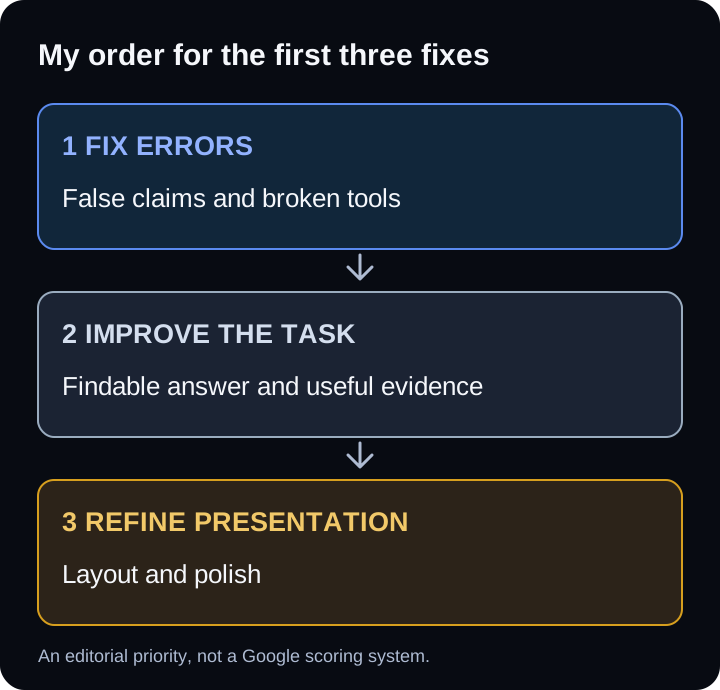
Write down the first three things you would change and who will do them. I would fix a broken tool or a false claim immediately, then improve the placement and clarity of the useful content. I would leave decorative changes until the core task works. This order is my practical judgement, not a priority scale published by Google.
Where I would start across a site
I would begin with pages that matter to customers and have evidence of demand: a service page that attracts enquiries, a tool people use, or a review visitors read before spending money. Search Console can show which landing pages get impressions and clicks; your own conversion data can show which ones lead to action. Neither metric measures content quality by itself.
For each candidate, compare the visitor's task with what the page actually delivers. A short, working calculator may deserve attention before a long article with a weak answer. A clear service description with an honest process may help more than adding another generic blog post. If the page already has a useful core, improve that page instead of creating another URL for the same question.
The update gives site owners a better vocabulary for this review. The work remains concrete: make the page do its job, show what you contributed, check the facts and describe the people behind it honestly.