Your dev team just sent a Figma link. The new design looks sharp. Everyone's excited. And nobody in the room is thinking about the 47 pages that currently drive 80% of your organic traffic.
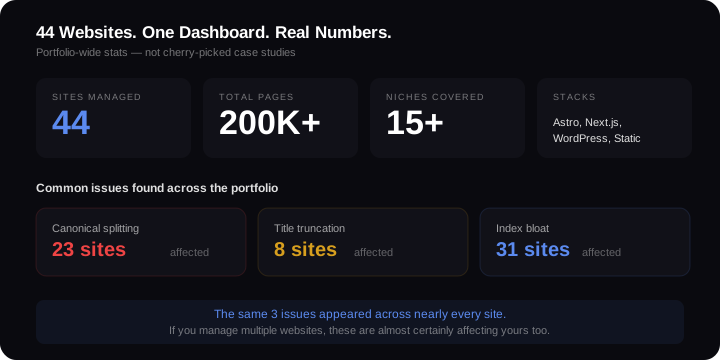
I've managed 44 websites across Astro, Next.js, WordPress, and static HTML. I've migrated sites between stacks, rebuilt them from scratch, and watched what happens when redesigns go wrong. The redesign itself is never the problem. It's what changes underneath that destroys rankings.
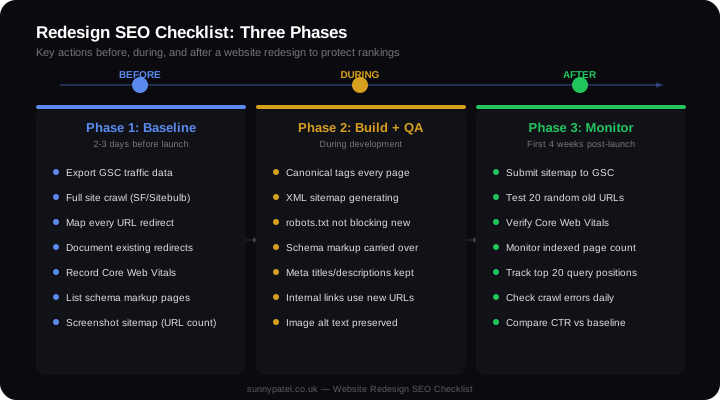
This is the exact checklist I use before, during, and after every redesign to protect organic traffic.
Why Redesigns Destroy Rankings
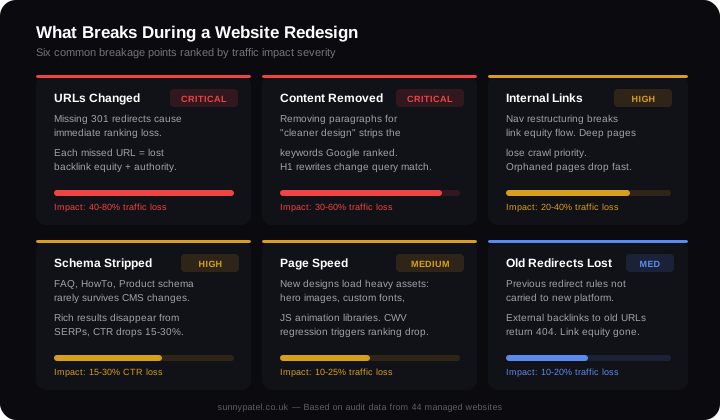
Google doesn't rank websites. It ranks individual pages based on specific signals: the URL, the content, the internal links pointing to it, the structured data, the page speed. A redesign can change every one of those signals simultaneously.
Here's what actually breaks:
- URLs change without redirects.
/blog/post-name/becomes/articles/post-name. Google treats these as completely different pages. Every old URL that returns a 404 loses all its accumulated ranking signals overnight. - Content gets removed or rewritten. Designers want cleaner pages. They remove paragraphs, rewrite headlines, strip out "unnecessary" text. That text is exactly what Google matched to search queries.
- Structured data gets stripped. Schema markup doesn't survive CMS changes unless someone deliberately migrates it. Most dev teams don't even check.
- Page speed regresses. The new design loads a 3MB hero image, two custom fonts, and a JavaScript animation library. Core Web Vitals go from green to red.
- Internal linking architecture changes. Navigation restructuring breaks the link equity flow that told Google which pages matter most.
I've seen all five happen in a single redesign. The site lost 62% of its organic traffic in 3 weeks. It took 5 months to recover to 80% of the original level. For more on timelines, see how long SEO takes under normal conditions — post-redesign recovery adds 2-4 months on top.
Phase 1: Before the Redesign (Your Baseline)
Everything that follows depends on having a clean snapshot of where you are right now. Skip this step and you won't know what broke.
Export Your Traffic Data
Pull every URL and its traffic from Google Search Console. Filter to the last 90 days. Export clicks, impressions, CTR, and average position for every page. Sort by clicks descending. The top 50 pages are the ones you absolutely cannot afford to break.
Crawl the Full Site
Use Screaming Frog or Sitebulb to crawl every URL. Document:
- Every URL and its HTTP status code
- All existing redirects (you'll need to preserve these)
- Pages with structured data (FAQ, HowTo, Product schema)
- Internal link counts per page
- Canonical tag configuration
- Core Web Vitals scores from PageSpeed Insights
This crawl is your insurance policy. Every post-launch issue gets diagnosed by comparing against it.
Screenshot the Current Sitemap
Download your XML sitemap. Count the URLs. This number should stay roughly the same after launch. If your current sitemap has 340 URLs and the new site generates 280, you've lost 60 pages from Google's index.
Phase 2: URL Mapping (The Most Critical Step)
This is where most redesigns fail. Every old URL must map to a new URL with a 301 redirect. Not a 302. Not a JavaScript redirect. A server-level 301.
Build the Redirect Map
Create a spreadsheet with two columns: old URL and new URL. Every single page from your crawl needs a row. If the URL structure changes from /blog/post-name/ to /articles/post-name/, every path needs a redirect.
Missing even one high-traffic URL can cost thousands in lost organic visits. A page ranking position 3 for a keyword with 8,000 monthly searches drives roughly 1,200 clicks per month. One missing redirect wipes that out.
Watch for Trailing Slash Issues
Across my 44-site portfolio, one missing trailingSlash config option caused Google to index duplicate URLs across 23 sites. /about and /about/ became two separate pages in Google's index, splitting authority between them. That single config line — trailingSlash: 'always' in Astro, trailingSlash: true in Next.js — fixed it across every site. Check this before launch, not after.
Preserve Existing Redirects
Your current site probably has redirects already in place from previous URL changes, old campaigns, or merged pages. These need to carry forward. If your old site redirected /services/consulting/ to /services/seo-consulting/, that redirect must still work after the redesign. Otherwise, any backlinks to the original URL break.
Phase 3: Content Preservation
Don't let designers remove text to "clean up" the page. If a page ranks for 40 keywords, those keywords are in the content. Removing paragraphs to make the design cleaner removes the content Google is ranking.
Protect Your Headlines
Rewriting H1 tags changes the primary signal Google uses to match queries. If your H1 is "Best Running Shoes for Flat Feet 2026" and the designer changes it to "Find Your Perfect Fit", you've removed every keyword Google was using to rank that page.
Keep Body Content Intact
I audit sites where the redesign removed 60% of the page content to fit a "modern minimal" layout. Every removed paragraph contained long-tail keywords the page ranked for. The page went from ranking for 40 queries to ranking for 8. That's a common SEO mistake I find during technical audits.
Migrate Meta Data
Meta titles, meta descriptions, and image alt text must transfer to the new site. These aren't design elements — they're ranking signals. If your CMS migration doesn't carry them over automatically, export them and reimport them manually.
Phase 4: Technical Checklist During Build
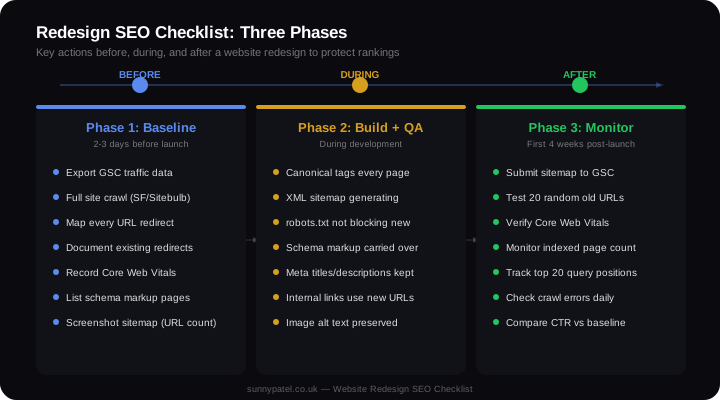
Run through this list before the site goes live. Every item is a binary check — it works or it doesn't.
- Canonical tags on every page, pointing to the correct URL (watch for trailing slash mismatches)
- XML sitemap generating correctly with all new URLs, no old URLs, no 404s
- robots.txt not blocking anything that wasn't blocked before (staging robots.txt rules are the number one cause of post-launch indexing failures)
- Structured data carried over — check with Google's Rich Results Test
- Meta titles and descriptions preserved from the old site
- Internal links updated to new URLs (not relying on redirects for internal navigation)
- Image alt text preserved across the migration
- hreflang tags if the site serves international audiences
- Open Graph and Twitter Card tags for social sharing
- 404 page returning a proper 404 status code (not a soft 404 that returns 200)
If you're switching CMS platforms, this list doubles in importance. A WordPress-to-Next.js migration changes how every one of these elements gets generated. For context on how acquisitions compound these risks, see SEO after acquisition.
Phase 5: Launch Day Protocol
Launch day isn't a celebration. It's the start of a monitoring sprint.
Immediate Actions (First Hour)
- Submit the new XML sitemap to Google Search Console
- Check robots.txt isn't blocking the site (open
yourdomain.com/robots.txtin a browser) - Test 20 random old URLs — confirm redirects return 301, not 302 or 404
- Run a PageSpeed Insights test on 5 key pages — Core Web Vitals should match or beat the baseline
- Check mobile rendering on 3 different screen sizes
First 24 Hours
- Run a full Screaming Frog crawl of the new site
- Compare URL count against your pre-launch crawl
- Check the GSC Coverage report for any new errors
- Verify all structured data with the Rich Results Test
- Test every form, CTA, and conversion point (these aren't SEO items, but broken conversions make the traffic worthless)
Phase 6: Post-Launch Monitoring
The redesign isn't done when it launches. It's done when your traffic stabilises.
Week 1-2: Daily Checks
Monitor these in Google Search Console every day:
- Indexed pages count. This should stay stable. If it drops by more than 5%, something is blocking crawling or returning errors.
- Crawl errors. Zero new 404s is the target. Every new 404 is a missed redirect.
- Impressions trend. A 10-20% dip in the first week is normal as Google recrawls. A 40%+ drop means something structural broke.
Week 2-4: Ranking Recovery
- Track positions for your top 20 queries. Minor fluctuations (1-3 positions) are normal. Drops of 10+ positions indicate a page-level problem — check the specific URL for content changes, missing schema, or redirect issues.
- Compare click-through rates against your baseline. If impressions recovered but clicks didn't, your new meta titles or page titles may be underperforming.
- Check for new crawl anomalies in GSC's Pages report. Watch for "Crawled — currently not indexed" increases.
When to Escalate vs When to Wait
Wait if: traffic dipped 10-20%, impressions are recovering, no new crawl errors, redirects are working. This is normal. Give it 3-4 weeks.
Escalate if: traffic dropped 40%+, indexed page count is falling, new 404 errors are appearing daily, or Core Web Vitals scores regressed significantly. These need immediate fixes, not patience.
The Real Cost of Getting This Wrong
A B2B SaaS company I audited redesigned their marketing site without URL mapping. They changed 180 URLs. Only 40 got redirects. The other 140 — including 12 pages that drove 65% of their organic demo requests — returned 404s for 6 weeks before anyone noticed.
Organic demo requests dropped 73%. Recovery took 4 months after implementing redirects. The redesign that was supposed to "modernise the brand" cost them an estimated £180,000 in pipeline.
The checklist above takes 2-3 days of preparation. Skipping it risks months of lost revenue. That's the trade-off.
If you want a second pair of eyes before your redesign launches, I offer technical SEO audits specifically for pre-migration reviews. I'll crawl both versions, map every redirect, and flag every risk before you push to production.