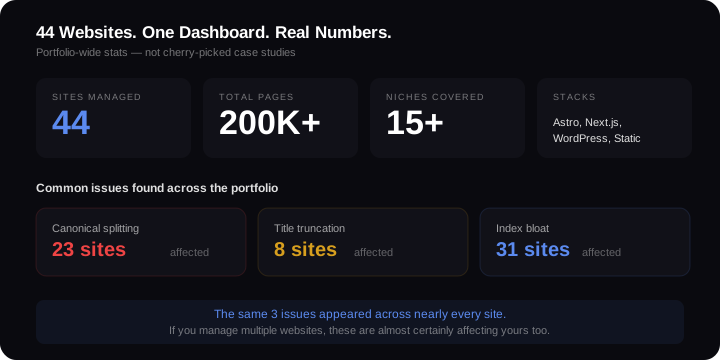
I run 44 websites. Not a typo. Forty-four separate properties across 15+ niches, totalling over 200,000 indexed pages. Some are WordPress, some Astro, some Next.js. Some earn money. Some don't yet.
Running this many sites has taught me things about multi-site SEO that no amount of theory could. When you manage a portfolio this size, problems don't stay isolated. They compound. A bad configuration choice on one site becomes a bad configuration choice on 23 sites. A weak title tag template doesn't cost you clicks on one page — it costs you clicks on 2,376 pages.
This post covers what actually happens when you manage SEO across multiple websites, and the systems I've built to keep it under control.
The Three Problems Nobody Warns You About
Most guides to multi-site SEO focus on the obvious stuff: separate Google Search Console properties, different hosting, distinct branding. That's table stakes. The real problems are harder to spot.
1. Your Own Sites Fight Each Other
When you own multiple sites in overlapping niches, Google doesn't know they belong to the same person. It treats them as competitors. If two of your sites target "best cordless vacuum" with similar content depth, Google picks one and suppresses the other. You've spent twice the effort for the same result.
This isn't theoretical. I've watched it happen in my own portfolio. The fix is keyword territory mapping — assigning distinct keyword clusters to each site so there's zero overlap. Site A owns "robot mowers." Site B owns "cordless lawn care." They serve the same broad niche but never chase the same query.
2. Technical Mistakes Replicate Across Every Site
This is the one that hurts most. When you build sites from shared templates or follow the same setup patterns, a single configuration error propagates everywhere.
In my portfolio audit, I found three issues appearing across the majority of sites:
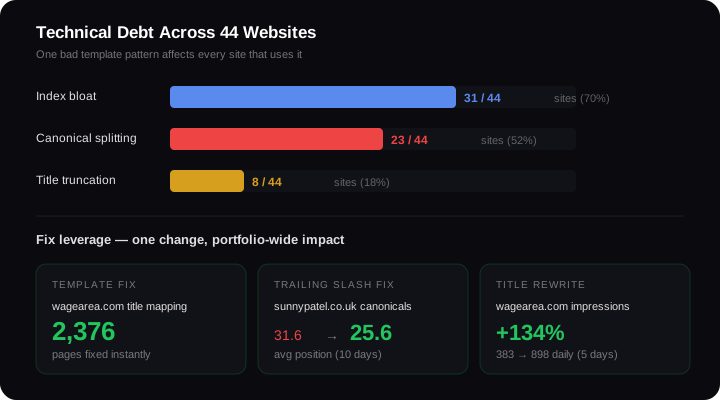
- Canonical URL splitting — 23 of 44 sites had Google indexing both trailing-slash and non-trailing-slash versions of the same pages
- Title tag truncation — 8 sites had programmatic titles exceeding Google's 55-60 character display limit
- Index bloat — 31 sites had pages in Google's index that shouldn't have been there (tag archives, parameter URLs, thin pagination pages)
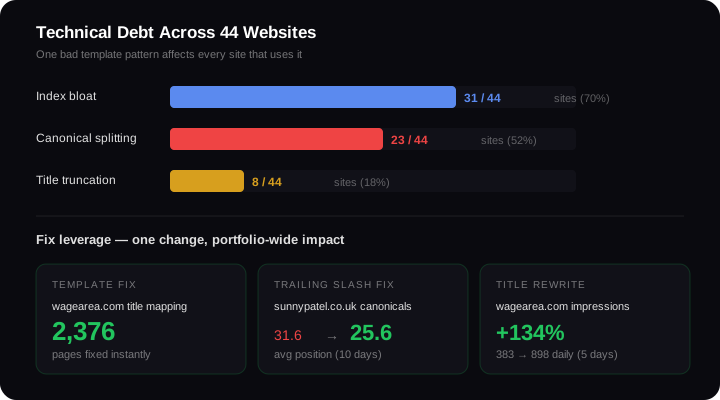
These aren't edge cases. They're the inevitable result of building multiple sites without a centralised quality check. One bad default in a shared Astro config file meant 23 sites launched with trailing slash problems from day one.
The upside? When you fix the root cause, you fix it everywhere. One template change on wagearea.com updated 2,376 pages simultaneously. That's the leverage of portfolio SEO done right.
3. You Can't Give Every Site Enough Attention
Forty-four sites means roughly 6.8 hours per site per month if I worked full-time on nothing else. That's not enough for content creation, technical maintenance, link building, and performance monitoring combined.
The honest answer: not every site deserves equal attention. Some get 20 hours a month. Some get 20 minutes. The difference is a prioritisation system based on data, not gut feeling.
How to Prioritise Which Sites Get Attention
I score every site across four dimensions:
- Revenue potential — Is this site in a monetisable niche? Does it have affiliate, ad, or lead-gen potential?
- Search volume — What's the total addressable search volume for this site's keyword territory?
- Technical health — How many critical issues does the site have right now?
- Competitive position — Is this site on page 1 for its target queries, or page 5?
A salary data site with 7,733 monthly impressions, 1,546 page-one rankings, and a fixable title truncation problem scores higher than a brand-new site with zero impressions and no obvious technical issues. The first site has latent value locked behind a template fix. The second needs months of content investment before anything moves.
This is why I fixed wagearea.com's titles before touching newer sites. One mapping function — shortOccName() — converted verbose government job classifications into search-friendly titles. Daily impressions jumped from 383 to 898 within 5 days. A 134% increase from a single template change.
That's the kind of ROI you chase in a portfolio. High leverage, low effort, immediate impact.
Keyword Cannibalisation Across a Portfolio
Cannibalisation between your own sites is different from cannibalisation within one site. When two pages on the same domain target the same keyword, Google picks the one it thinks is best. When two separate domains you own target the same keyword, you're paying for content, hosting, and maintenance on both — and only one will rank.
How to Detect Cross-Site Cannibalisation
Pull your Google Search Console data for all properties. Export the queries each site ranks for. Look for overlaps. If site A and site B both appear in GSC data for the same query, you have cannibalisation.
I use a centralised GSC monitoring setup that pulls data from all 44 properties into one view. When the same query appears for multiple sites, I flag it and decide which site should own it based on:
- Which site has stronger topical authority in that area
- Which site has more supporting content around that topic
- Which site has better technical health and faster page speed
The losing site gets a noindex on that specific page, or I rewrite the content to target an adjacent keyword instead.
How to Prevent It
Prevention is simpler than detection. Before creating content on any site, I check whether another site in the portfolio already targets that keyword. Each site has a defined keyword territory document. If a keyword falls outside that territory, it doesn't get published there — regardless of how tempting it looks.
When to Merge vs Keep Separate
This decision costs portfolio owners more money than almost any other SEO choice.
Merge when:
- Two sites target the same niche and the same audience
- Neither site has enough content depth to build topical authority alone
- You're splitting backlinks and brand mentions between them
- Maintaining both costs more than the combined traffic justifies
Keep separate when:
- The sites serve genuinely different niches (a pet products site and a calculator tool have nothing in common)
- Each site has distinct keyword territories with no overlap
- The audiences are different even if the broad topic is similar
- One site is location-specific and the other is national/global
I've made both decisions in my portfolio. Sites that covered overlapping product review categories got consolidated. Sites in completely separate verticals — energy data, salary information, health products — stayed independent because merging them would dilute topical relevance and confuse Google about what the combined site was actually about.
The Systems That Make Multi-Site SEO Manageable
Running 44 sites without systems would be chaos. Here's what I actually use:
Centralised GSC Monitoring
Every site connects to Google Search Console through a service account. I pull 28-day snapshots across all properties and flag sites where impressions drop more than 15%, CTR falls below niche benchmarks, or new crawl errors appear.
This takes the "check all 44 sites manually" problem and reduces it to "review the flagged sites." On a typical week, 5-8 sites need attention. The other 36+ are fine.
Templated Technical Audits
Every technical SEO audit follows the same checklist: canonical configuration, index coverage, title tag lengths, Core Web Vitals, internal link structure, sitemap accuracy. Running the same checks in the same order means I catch the same issues faster.
When I find a new issue type — like the trailing slash problem — I add it to the template and retroactively check all 44 sites. That's how I discovered 23 sites had the same canonical splitting issue. Without a systematic approach, I'd have found it on one site and assumed it was isolated.
Scheduled Rebuilds
Twelve of my Astro-based sites run weekly automated rebuilds via GitHub Actions every Monday at 06:00 UTC. This ensures sitemap freshness, catches build errors early, and keeps deployment pipelines tested. If a rebuild fails, I get notified before Google notices anything wrong.
Systematic Title Frameworks
Every programmatic site follows a title tag framework designed to stay under 55 characters. The framework accounts for the longest possible dynamic insertion (city name, job title, product name) and truncates gracefully. No more discovering three months later that 800 pages have broken titles because someone added a suffix to the template.
Resource Allocation: The Honest Numbers
Here's what multi-site SEO actually requires in terms of time:
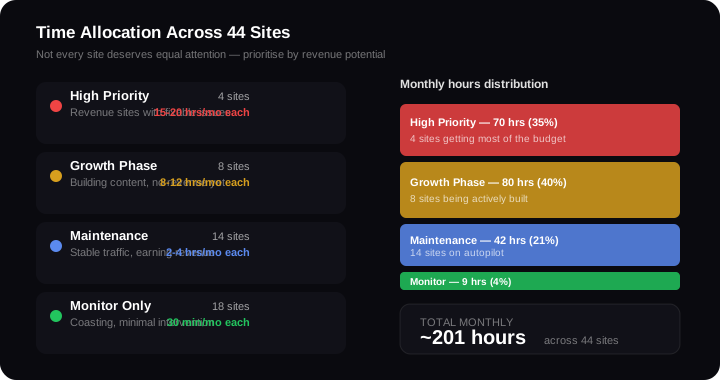
- High-priority sites (strong revenue, fixable issues): 15-20 hours/month each
- Growth-phase sites (building content, no revenue yet): 8-12 hours/month each
- Maintenance sites (stable traffic, earning revenue): 2-4 hours/month each
- Monitoring-only sites (coasting, minimal intervention): 30 minutes/month each
Most of my 44 sites fall into the last two categories. That's the goal. Build a site, optimise it, get it earning, then move it to maintenance mode so you can focus energy on the next high-potential property.
If you're thinking about running multiple sites, be realistic about the time commitment. SEO takes months to show results on a single site. Across a portfolio, you need patience multiplied by the number of properties — and the discipline to avoid spreading yourself so thin that nothing gets enough attention to succeed.
The Portfolio Advantage
Despite the complexity, managing multiple websites has one massive advantage over managing one: pattern recognition at scale.
When you see the same SEO mistake on 23 of 44 sites, you know it's not a one-off — it's a systemic issue. When a title tag fix produces a 134% impression increase on one site, you can apply the same fix to 7 other sites with the same problem and reasonably expect similar results.
Single-site SEO gives you anecdotes. Portfolio SEO gives you data.
The trailing slash fix on sunnypatel.co.uk moved average position from 31.6 to 25.6. I then applied the same fix to 22 other sites. That's the compound return of managing SEO across multiple websites — every lesson learned multiplies across the entire portfolio.