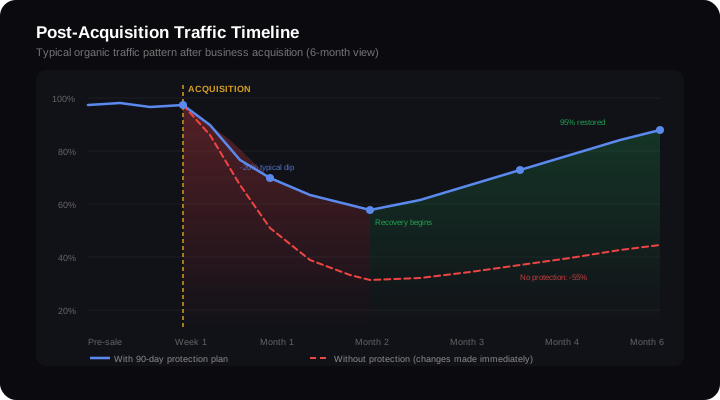
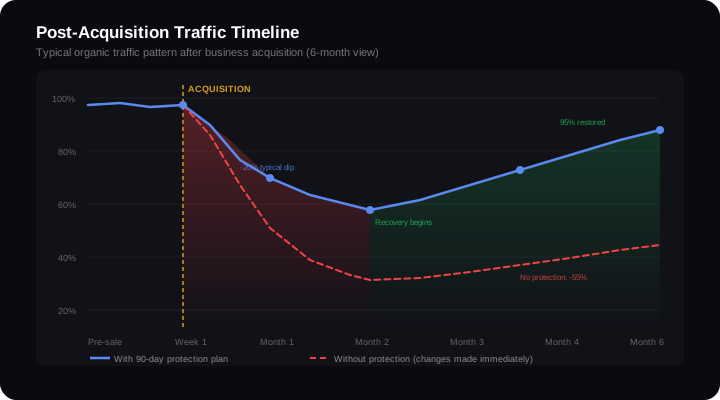
I've watched organic traffic collapse after business acquisitions more times than I can count. Not because the buyer did something reckless — because they did something reasonable. They upgraded the hosting. They tidied the URLs. They rewrote the homepage copy. 6 weeks later, they're staring at a 40% traffic drop wondering what happened.
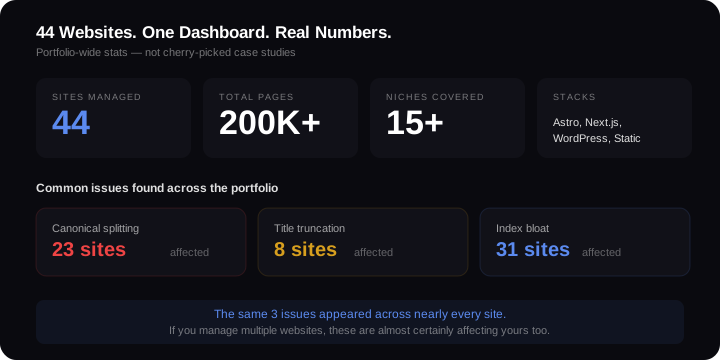
Managing 44 websites across different stacks and stages taught me how fragile organic traffic is during ownership changes. The patterns are predictable. The damage is preventable. But only if you know what not to touch — and when.
Why Traffic Almost Always Drops After Acquisition
Google ranks pages, not businesses. It doesn't care that ownership changed. It cares whether the signals it relied on to rank those pages still exist. Acquisitions break those signals in six predictable ways.
Domain migrations done wrong. Buyer rebrands, moves content to a new domain, and either skips 301 redirects or sets up partial redirects that miss 30-60% of old URLs. Every missing redirect is a page that loses all its ranking signals overnight.
Hosting changes that break page speed. The old site loaded in 1.2 seconds on a tuned VPS. New owner moves it to shared hosting, load time jumps to 3.8 seconds. Core Web Vitals fail. Google deprioritises the site within 2-3 crawl cycles.
CMS switches that change URLs. WordPress to Shopify. Shopify to headless. /blog/seo-tips/ becomes /articles/seo-tips or /pages/seo-tips.html. Without redirects, Google treats every changed URL as a brand new page with zero authority.
Redirects that don't get set up. I've audited sites where the previous owner had 200+ redirects handling old URLs, legacy campaigns, and duplicate pages. The buyer migrated content but not the redirect rules. Every old URL started returning 404s — backlinks pointing to them became worthless.
Content changes that remove ranking signals. The new marketing team rewrites "outdated" copy, not realising those specific phrases were the exact queries Google ranked the page for. One rewrite can drop a page from position 3 to position 30.
GSC ownership not transferred. The buyer doesn't get Google Search Console access until weeks after close. Crawl errors accumulate unnoticed, sitemap submissions lapse, or a robots.txt change blocks half the site from indexing.
If you're still in the buying phase, read my full SEO due diligence checklist for investors before you sign anything.
The First 30 Days: Touch Nothing, Document Everything
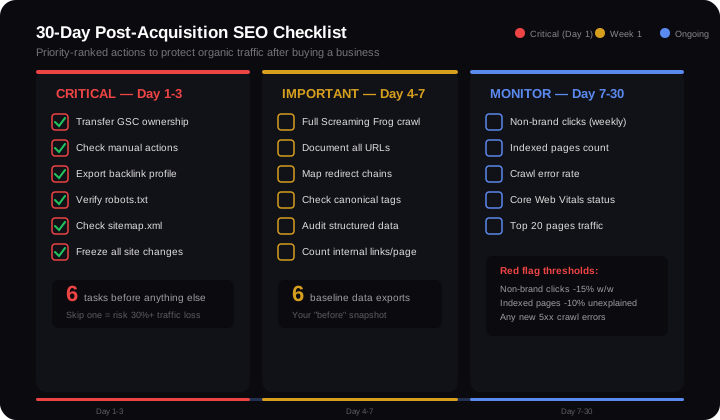
The single most important rule: don't change anything for 30 days. Not the design. Not the copy. Not the hosting. Nothing. You need a clean baseline before you can measure the impact of any future changes.
Day 1-3: Transfer and Verify
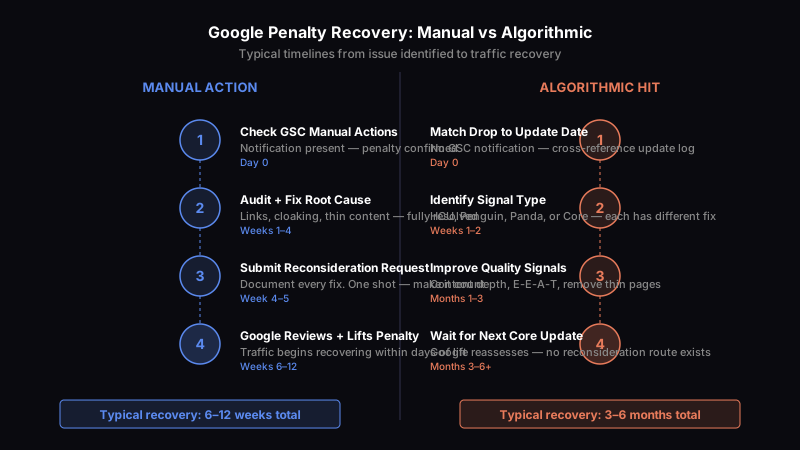
- Transfer Google Search Console ownership. Not viewer access — full ownership. Check for manual actions under Security & Manual Actions immediately. An active penalty means the traffic you bought has an expiry date.
- Export the full backlink profile from Ahrefs or Moz. This is your insurance policy — if links break later, you need to know what existed before.
- Verify robots.txt and sitemap.xml. Confirm Google can crawl everything it should, and nothing has been accidentally blocked. I've found robots.txt files that blocked
/wp-content/uploads/— meaning Google couldn't see any images on the site.
Day 4-7: Full Crawl Baseline
Run a complete crawl with Screaming Frog or Sitebulb. Document:
- Every URL and its HTTP status code
- All redirect chains (especially chains longer than 2 hops)
- Pages returning 404 or 5xx errors
- Canonical tag consistency
- Structured data presence and validity
- Internal link counts per page
This crawl is your before snapshot. Every decision you make in months 2-6 gets measured against it.
Day 7-30: Monitor Without Interfering
Track three numbers weekly in Google Search Console:
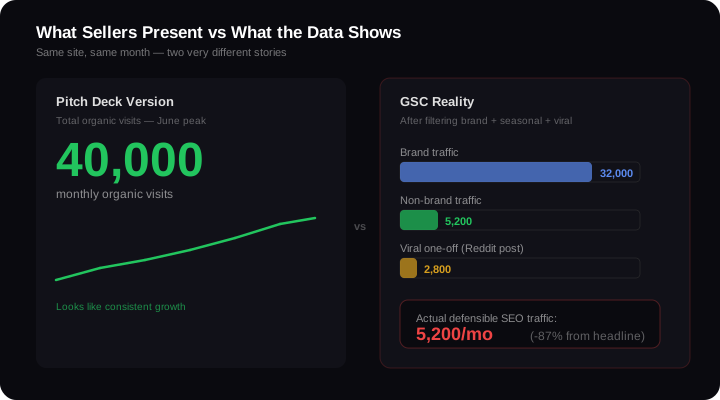
- Non-brand clicks. Filter out your brand name and domain variations. This is your real organic performance — the traffic Google sends because your content ranks, not because someone already knows your name.
- Indexed pages count. Go to Pages > Indexed. If this number starts dropping without you making changes, something's wrong — possibly a crawl directive you inherited, or Google reassessing content quality.
- Crawl errors. Under Settings > Crawl stats, watch for spikes in 404s, server errors, or crawl rate drops. These are early warning signals.
Domain Migration: When You Must vs When You Shouldn't
Sometimes rebranding requires a domain migration. Sometimes the buyer prefers a different name. Very different situations, very different risk profiles.
When Migration Makes Sense
- The acquired brand is being fully absorbed into the buyer's existing brand
- The old domain has legal or reputational issues
- You're consolidating multiple acquisitions under one domain
When It Doesn't
- The old domain has strong backlinks and authority (DA 40+, hundreds of referring domains)
- Organic traffic is the primary revenue driver
- You're migrating for cosmetic reasons ("we like the new name better")
If the old domain drives revenue through organic search, keeping it is almost always the right call. I've seen migrations done perfectly — every 301 redirect in place, every URL mapped — still lose 20-30% of organic traffic for 3-6 months while Google transfers signals. That's the best case scenario.
The worst case: a retail site migrated 12,000 product URLs to a new domain. They mapped 90% of redirects correctly. The 10% they missed included their top 50 revenue pages. Organic revenue dropped 45% in 8 weeks. Recovery took 7 months. For context on timelines, here's how long SEO takes under normal conditions — post-migration, add 3-6 months on top.
CMS and Hosting Changes: The Hidden Cost of "Upgrading"
Buyers love upgrading the tech stack. WordPress feels dated. Shopify is cleaner. A headless CMS sounds modern. The SEO consequences are rarely discussed.
URL Structure Breaks
WordPress uses /category/product-name/. Shopify uses /products/product-name. Custom builds use /shop/product-name.html. A CMS migration without a complete URL mapping and redirect plan breaks every internal link, every external backlink, and every indexed URL simultaneously.
I've managed sites across WordPress, Shopify, Astro, Next.js, and static HTML. The stack matters less than people think. What matters is whether the URLs stay the same.
Hosting Changes and Core Web Vitals
Swapping hosting providers can shift Largest Contentful Paint by 1-3 seconds. That's the difference between passing and failing Core Web Vitals. Google uses page experience as a tiebreaker — and in competitive niches, tiebreakers decide rankings.
Before migrating hosting, run WebPageTest from the new server with identical content. Compare LCP, CLS, and INP against the baseline. If any metric degrades, fix it before switching DNS.
What Gets Lost in "Upgrades"
- Structured data. The old WordPress theme had FAQ schema, HowTo schema, and review markup. The new build doesn't. Rich results vanish overnight.
- Internal linking. The old CMS auto-generated related post links, breadcrumbs, and category pages. The new build has a cleaner design — and 60% fewer internal links.
- Meta data. RankMath or Yoast had custom titles and descriptions for every page. The new CMS auto-generates meta tags that truncate at 45 characters.
These aren't technical failures. They're common SEO mistakes that happen because the migration team focuses on design and functionality, not on preserving the signals Google relied on.
Content Changes That Kill Rankings
This is where well-intentioned marketing teams do the most damage.
Removing "Outdated" Pages
The new owner audits the blog. Half the posts are 3 years old. "Let's remove the outdated content and start fresh." Except 6 of those "outdated" posts drive 40% of the site's non-brand traffic. Delete them and organic revenue craters within 2 crawl cycles.
Before removing any page, check GSC for that URL. If it has impressions, clicks, or backlinks — it stays.
Rewriting Copy That Ranks
A page ranks position 2 for "best project management software for small teams." The new marketing team rewrites the headline to "Streamline Your Team's Workflow Today." The keyword disappears from the H1. The page drops to position 14. Google ranked the original because it matched the exact language searchers use.
Redesigns That Strip Structured Data
A fresh design is often the first thing a buyer commissions. The new agency builds beautiful pages that load fast and look sharp. They also remove the FAQ schema, the breadcrumb markup, the author bylines, and the publication dates. Every structured data signal that helped Google understand and feature the content — gone.
Run a technical SEO audit before and after any redesign. Compare structured data, heading hierarchy, and internal link counts page by page. If the new design removes signals the old one had, add them back before launch.
The 90-Day Protection Plan
Here's how I'd phase the first three months after acquisition to protect organic traffic while still moving the business forward.
Days 1-30: Observe and Document
- Transfer GSC ownership
- Full crawl baseline
- Weekly tracking: non-brand clicks, indexed pages, crawl errors
- Zero changes to the live site
Days 31-60: Small, Isolated Changes
- Fix any crawl errors or broken redirects found in month 1
- Improve Core Web Vitals if they're failing (image compression, caching — nothing structural)
- Update meta titles and descriptions on top 10 traffic pages only (track impact individually)
- Each change gets logged with date and affected URLs
The principle: one change at a time, measured in isolation. If traffic drops after you changed 50 things simultaneously, you'll never find the cause.
Days 61-90: Strategic Changes
- CMS migration (if needed) with complete URL mapping
- Content updates on pages where you have clear improvement data
- New content targeting gaps identified in the first 60 days of GSC data
- Structured data additions for pages missing schema
What to Monitor Weekly Throughout
| Metric | Where to Check | Red Flag |
|---|---|---|
| Non-brand clicks | GSC Performance | 15%+ drop week-on-week |
| Indexed pages | GSC Pages | 10%+ drop without intentional removals |
| Crawl errors | GSC Settings > Crawl stats | Any new 5xx errors |
| Core Web Vitals | GSC Experience | Any metric moving from pass to fail |
| Top 20 pages traffic | GSC Performance by page | Any top page losing 25%+ clicks |
The Bottom Line
Organic traffic is the most valuable and most fragile asset in most acquisitions. It compounds over years. It can collapse in weeks.
The buyers who protect it follow a pattern: transfer GSC on day 1, change nothing for 30 days, make isolated changes they can measure, and treat every URL, redirect, and line of ranking copy as infrastructure — not decoration.
If you're about to acquire a business where organic traffic matters, get the due diligence right first. Then protect what you've bought with the 90-day plan above. The cost of patience is 90 days. The cost of rushing is 6-12 months of recovery — if it recovers at all.